<?xml version="1.0" encoding="utf-8"?><feed xmlns="http://www.w3.org/2005/Atom" ><generator uri="https://jekyllrb.com/" version="3.10.0">Jekyll</generator><link href="/feed.xml" rel="self" type="application/atom+xml" /><link href="/" rel="alternate" type="text/html" /><updated>2026-03-03T22:39:57+00:00</updated><id>/feed.xml</id><title type="html">code, music and rants</title><subtitle>Thoughts, stories and ideas.</subtitle><author><name>Ricardo Rosales</name></author><entry><title type="html">My Windows 11 and Pop!_OS 22.04 dual boot setup</title><link href="/win-linux-dual-boot/" rel="alternate" type="text/html" title="My Windows 11 and Pop!_OS 22.04 dual boot setup" /><published>2022-08-07T00:00:00+00:00</published><updated>2022-08-07T00:00:00+00:00</updated><id>/win-linux-dual-boot</id><content type="html" xml:base="/win-linux-dual-boot/"><![CDATA[<h2 id="tools-and-characteristics">Tools and characteristics</h2>

<ul>
  <li><a href="https://en.wikipedia.org/wiki/GUID_Partition_Table">GUID Partition Table (GPT)</a></li>
  <li><a href="https://en.wikipedia.org/wiki/UEFI">UEFI</a></li>
  <li><a href="https://gitlab.com/cryptsetup/cryptsetup/">luks</a></li>
  <li><a href="https://github.com/ventoy/Ventoy/releases">Ventoy</a></li>
  <li>USB drive with 32+ GB of space</li>
  <li>ISOs:
    <ul>
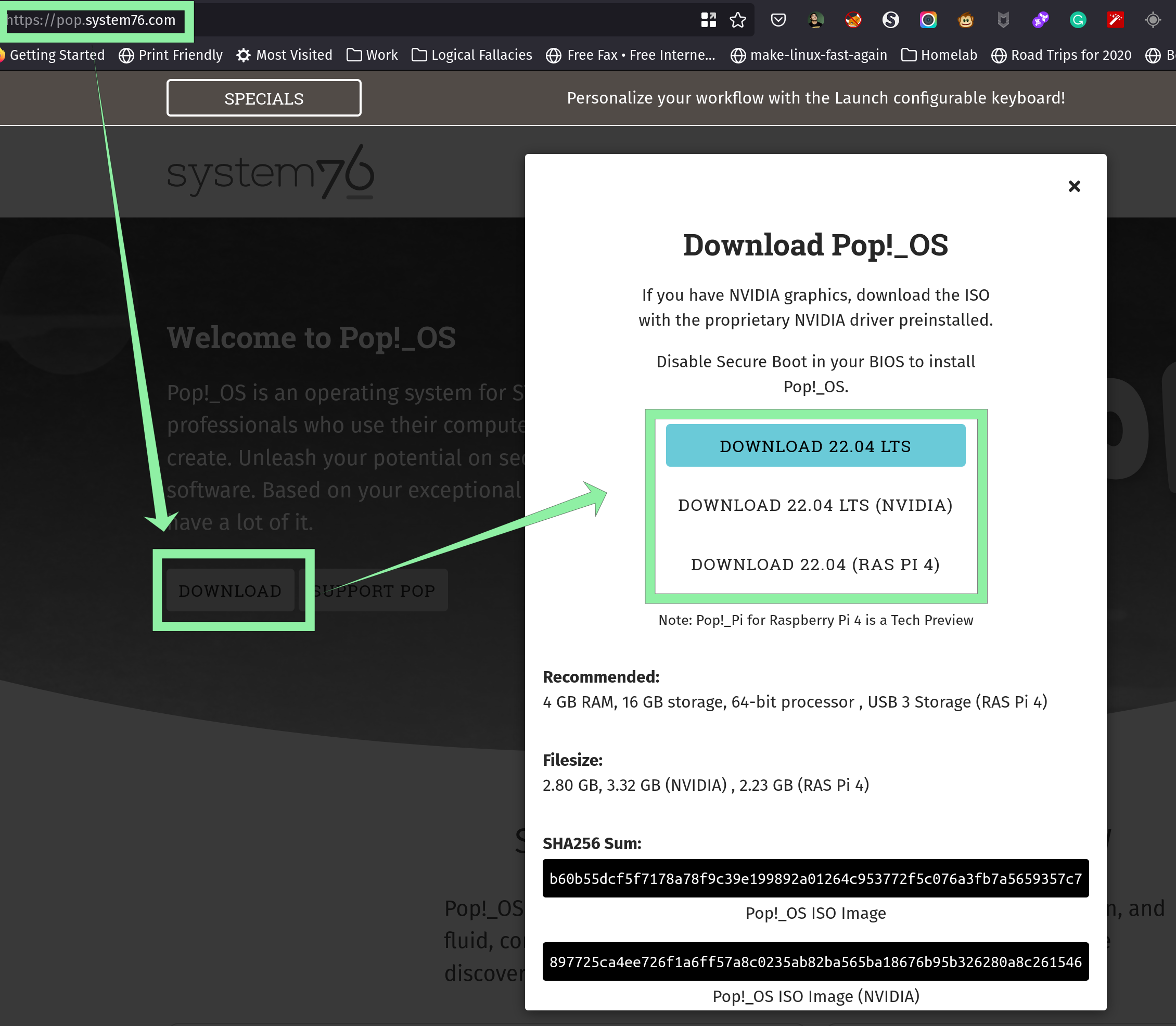
      <li><a href="https://pop.system76.com/"><code class="language-plaintext highlighter-rouge">Pop!_OS</code></a>
<img src="/assets/images/win-linux-dual-boot/01-download-pop-os.png" alt="download-pop-os" /></li>
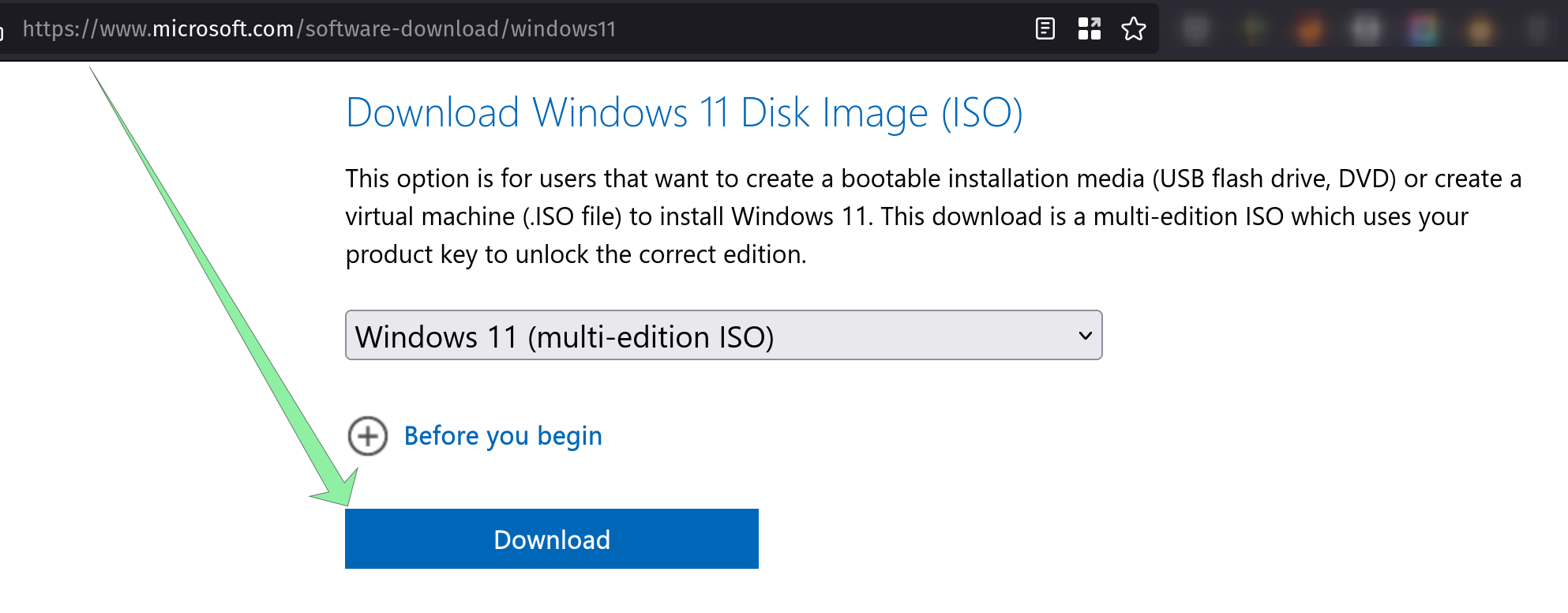
      <li><a href="https://www.microsoft.com/software-download/windows11"><code class="language-plaintext highlighter-rouge">Windows 11</code></a>
<img src="/assets/images/win-linux-dual-boot/02-download-windows-11.png" alt="download-win-11" /></li>
    </ul>
  </li>
</ul>

<h2 id="setup">Setup</h2>

<h3 id="install-and-configure-ventoy">Install and configure Ventoy</h3>

<ul>
  <li><a href="https://www.ventoy.net/en/doc_start.html">Ventoy installation instructions</a></li>
  <li>Add <code class="language-plaintext highlighter-rouge">Windows</code> and <code class="language-plaintext highlighter-rouge">Pop!_OS</code> ISOs to ventoy folder in USB drive</li>
</ul>

<h3 id="create-partitions-first-using-gparted-in-live-pop_os">Create partitions first using <code class="language-plaintext highlighter-rouge">gparted</code> in live <code class="language-plaintext highlighter-rouge">Pop!_OS</code></h3>

<ul>
  <li>Boot into <code class="language-plaintext highlighter-rouge">Pop!_OS</code> and create 5 partitions:</li>
</ul>

<ol>
  <li>The <code class="language-plaintext highlighter-rouge">EFI</code> partition I recommend you use 512MB <code class="language-plaintext highlighter-rouge">FAT32</code> (it is more than
necessary)</li>
  <li>The <code class="language-plaintext highlighter-rouge">MSR</code> partition should be 128MB FAT32 will be for Windows</li>
  <li>The actual windows installation whatever you want, I recommend more than
100GB <code class="language-plaintext highlighter-rouge">NTFS</code></li>
  <li>The <code class="language-plaintext highlighter-rouge">/boot</code> partition for linux I recommend 1GB <code class="language-plaintext highlighter-rouge">xfs</code></li>
  <li>The <code class="language-plaintext highlighter-rouge">Linux LVM</code> partition whatever is left of the disk using <code class="language-plaintext highlighter-rouge">linux pv</code></li>
</ol>

<h3 id="install-windows-11-without-encryption">Install Windows 11, without encryption</h3>

<ul>
  <li>When choosing partitions press <code class="language-plaintext highlighter-rouge">Shift</code> + <code class="language-plaintext highlighter-rouge">F10</code> to open <code class="language-plaintext highlighter-rouge">command prompt</code></li>
  <li>In Command prompt, run <code class="language-plaintext highlighter-rouge">diskpart</code></li>
  <li>Run <code class="language-plaintext highlighter-rouge">list disk</code> to get a list of disks and their numbers</li>
  <li>Run <code class="language-plaintext highlighter-rouge">select disk &lt;number&gt;</code> to switch context to a specific disk</li>
  <li>Run <code class="language-plaintext highlighter-rouge">list partition</code> to get a list of partitions and their numbers, you
should see the partitions you created in step <code class="language-plaintext highlighter-rouge">1</code></li>
  <li>Run <code class="language-plaintext highlighter-rouge">select partition &lt;number for EFI&gt;</code></li>
  <li>Run <code class="language-plaintext highlighter-rouge">create partition efi size=512</code> to create <code class="language-plaintext highlighter-rouge">efi</code> partition</li>
  <li>Run <code class="language-plaintext highlighter-rouge">select partition &lt;number for MSR&gt;</code></li>
  <li>Run <code class="language-plaintext highlighter-rouge">create partition msr size=128</code> to create <code class="language-plaintext highlighter-rouge">msr</code> partition</li>
  <li>Run <code class="language-plaintext highlighter-rouge">exit</code> to go back to windows installation</li>
  <li>Make sure windows installer sees EFI and MSR partitions</li>
  <li>Select the partition you created in step <code class="language-plaintext highlighter-rouge">1</code> for windows to be installed on</li>
  <li>Install windows, updates, activate etc</li>
</ul>

<h3 id="now-install-pop_os-or-ubuntu">Now install <code class="language-plaintext highlighter-rouge">Pop!_OS</code> (or Ubuntu)</h3>

<ul>
  <li>Press <code class="language-plaintext highlighter-rouge">Try Demo Mode</code> to get to the desktop</li>
  <li>Open terminal</li>
  <li><code class="language-plaintext highlighter-rouge">sudo su -</code></li>
  <li><code class="language-plaintext highlighter-rouge">fdisk -l</code> to find your <code class="language-plaintext highlighter-rouge">Linux LVM</code> partition</li>
  <li><code class="language-plaintext highlighter-rouge">cryptsetup luksFormat /dev/nvme#n#p#</code> this will encrypt and ask you to
setup a passphrase</li>
  <li><code class="language-plaintext highlighter-rouge">cryptsetup open /dev/nvme#n#p# luks1</code> to decrypt the partition and mount it
at <code class="language-plaintext highlighter-rouge">/dev/mapper/luks1</code></li>
  <li><code class="language-plaintext highlighter-rouge">pvcreate /dev/mapper/luks1</code> to create a <code class="language-plaintext highlighter-rouge">Physical Volume</code> that LVM can use</li>
  <li><code class="language-plaintext highlighter-rouge">vgcreate vg_hostname /dev/mapper/luks1</code> (used <code class="language-plaintext highlighter-rouge">vg_thinkpad</code> last time)</li>
  <li><code class="language-plaintext highlighter-rouge">lvcreate -L 100G -n lv_root vg_hostname</code> # at least 100 GB</li>
  <li><code class="language-plaintext highlighter-rouge">lvcreate -L 4G -n lv_swap vg_hostname</code></li>
  <li><code class="language-plaintext highlighter-rouge">lvcreate -l100%FREE -n lv_home vg_hostname</code></li>
  <li>Open the regular installer, choose <code class="language-plaintext highlighter-rouge">custom partitioning</code></li>
  <li>Create <code class="language-plaintext highlighter-rouge">/boot</code> without encryption</li>
  <li>Select <code class="language-plaintext highlighter-rouge">EFI</code> partition and mount it at <code class="language-plaintext highlighter-rouge">/boot/efi</code></li>
  <li>Decrypt <code class="language-plaintext highlighter-rouge">Linux LVM</code> partition</li>
  <li>Select 100 GB and pick <code class="language-plaintext highlighter-rouge">/</code> for it and format using <code class="language-plaintext highlighter-rouge">xfs</code></li>
  <li>Select 4 GB as swap</li>
  <li>Select last LVM partition for <code class="language-plaintext highlighter-rouge">/home</code> and format using <code class="language-plaintext highlighter-rouge">xfs</code></li>
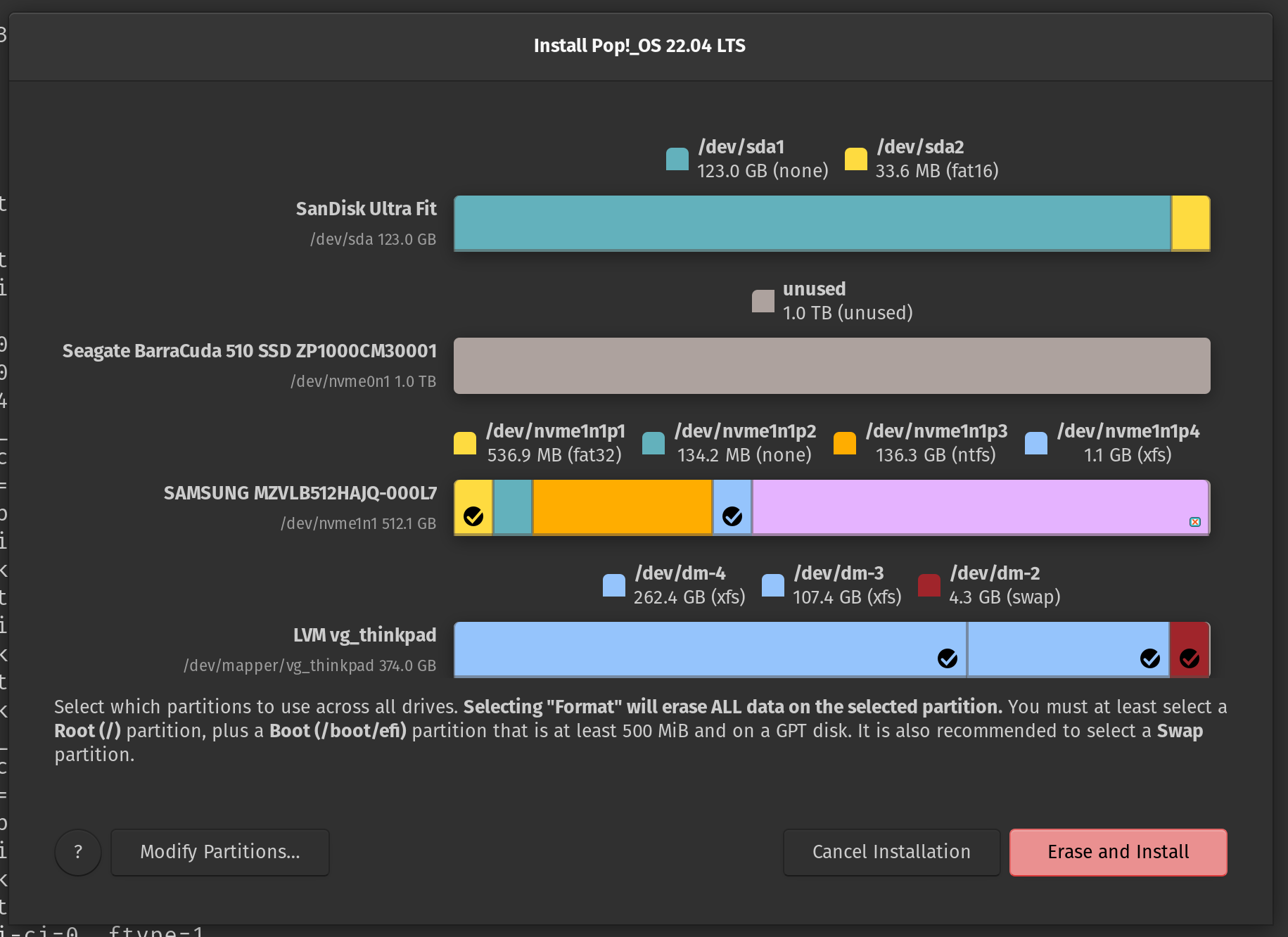
  <li>Should look something like this
<img src="/assets/images/win-linux-dual-boot/00-gparted-looks-like.png" alt="custom-install" /></li>
  <li>When the installer finishes, <strong>don’t reboot</strong></li>
  <li>Open terminal, again</li>
  <li><code class="language-plaintext highlighter-rouge">sudo su -</code></li>
  <li><code class="language-plaintext highlighter-rouge">blkid /dev/nvme#n#p#</code> for the <code class="language-plaintext highlighter-rouge">Linux LVM</code> partition</li>
  <li><code class="language-plaintext highlighter-rouge">cryptsetup open /dev/nvme#n#p# luks1</code> to decrypt the partition</li>
  <li><code class="language-plaintext highlighter-rouge">parted -ls</code></li>
  <li><code class="language-plaintext highlighter-rouge">mount /dev/mapper/vg_thinkpad-lv_root /mnt</code> Change volume group name</li>
  <li><code class="language-plaintext highlighter-rouge">mount /dev/mapper/vg_thinkpad-lv_home /mnt/home</code> Change vg name</li>
  <li><code class="language-plaintext highlighter-rouge">mount /dev/nvme#n#p# /mnt/boot</code> Change device and partition numbers</li>
  <li><code class="language-plaintext highlighter-rouge">mount /dev/nvme1n1p1 /mnt/boot/efi</code> Change device and partition numbers</li>
  <li><code class="language-plaintext highlighter-rouge">for i in dev dev/pts proc sys run; do mount -B "/${i}" "/mnt/${i}"; done</code></li>
  <li><code class="language-plaintext highlighter-rouge">chroot /mnt</code></li>
  <li>We are now inside the installed system, not the live environment</li>
  <li>
    <p><code class="language-plaintext highlighter-rouge">cat /etc/crypttab</code> Confirm UUID matched blkid output above</p>

    <div class="language-shell highlighter-rouge"><div class="highlight"><pre class="highlight"><code><span class="c"># cat /etc/crypttab</span>
luks1 <span class="nv">UUID</span><span class="o">=</span>0000000 none luks
</code></pre></div>    </div>
  </li>
  <li>if <code class="language-plaintext highlighter-rouge">/etc/crypttab</code> does not exist create it</li>
  <li>
    <p>Next, confirm the <code class="language-plaintext highlighter-rouge">/</code> root partition UUID matches the <code class="language-plaintext highlighter-rouge">Pop_OS</code> UUID in
<code class="language-plaintext highlighter-rouge">/boot/efi/EFI/Pop-OS*</code></p>

    <div class="language-shell highlighter-rouge"><div class="highlight"><pre class="highlight"><code><span class="c"># grep "$(ls -d /boot/efi/EFI/Pop_OS-* | cut -d '-' -f2-)" /etc/fstab</span>
<span class="nv">UUID</span><span class="o">=</span>3333333333  /  xfs  defaults  0  0
</code></pre></div>    </div>
  </li>
  <li>
    <p>Confirm you have <code class="language-plaintext highlighter-rouge">/</code>, <code class="language-plaintext highlighter-rouge">/boot</code>, <code class="language-plaintext highlighter-rouge">/boot/efi</code>, <code class="language-plaintext highlighter-rouge">/home</code> and swap partitions in
<code class="language-plaintext highlighter-rouge">/etc/fstab</code></p>

    <div class="language-shell highlighter-rouge"><div class="highlight"><pre class="highlight"><code><span class="c"># cat /etc/fstab</span>
<span class="c"># /etc/fstab: static file system information.</span>
<span class="c">#</span>
<span class="c"># Use 'blkid' to print the universally unique identifier for a</span>
<span class="c"># device; this may be used with UUID= as a more robust way to name devices</span>
<span class="c"># that works even if disks are added and removed. See fstab(5).</span>
<span class="c">#</span>
<span class="c"># &lt;file system&gt;  &lt;mount point&gt;  &lt;type&gt;  &lt;options&gt;  &lt;dump&gt;  &lt;pass&gt;</span>
<span class="nv">PARTUUID</span><span class="o">=</span>44444  /boot/efi  vfat  <span class="nb">umask</span><span class="o">=</span>0077  0  0
<span class="nv">UUID</span><span class="o">=</span>55555  /boot  xfs  defaults  0  0
<span class="nv">UUID</span><span class="o">=</span>666666  /home  xfs  defaults  0  0
<span class="nv">UUID</span><span class="o">=</span>3333333333  /  xfs  defaults  0  0
/dev/dm-2  none  swap  defaults  0  0
</code></pre></div>    </div>
  </li>
  <li>if <code class="language-plaintext highlighter-rouge">swap</code> in <code class="language-plaintext highlighter-rouge">/etc/fstab</code> does not show <code class="language-plaintext highlighter-rouge">UUID</code>, you can obtain it via the
command: <code class="language-plaintext highlighter-rouge">blkid | grep swap</code>, now update swap line in <code class="language-plaintext highlighter-rouge">/etc/fstab</code></li>
  <li>As of kernel <code class="language-plaintext highlighter-rouge">5.11.0-40-generic</code> there’s a ~45-second pause at boot while
the system tries to find a non-existent resume device, so we’ll disable
resume.</li>
  <li>
    <p>Create the file <code class="language-plaintext highlighter-rouge">/etc/initramfs-tools/conf.d/noresume.conf</code> with contents:</p>

    <div class="language-text highlighter-rouge"><div class="highlight"><pre class="highlight"><code>RESUME=none
</code></pre></div>    </div>
  </li>
  <li>
    <p>If you want to mount <code class="language-plaintext highlighter-rouge">/tmp</code> as <code class="language-plaintext highlighter-rouge">tmpfs</code> (ramdisk) then:</p>

    <div class="language-shell highlighter-rouge"><div class="highlight"><pre class="highlight"><code><span class="nb">ln</span> <span class="nt">-s</span> /usr/share/systemd/tmp.mount /etc/systemd/system/
systemctl <span class="nb">enable </span>tmp.mount
</code></pre></div>    </div>
  </li>
</ul>

<h3 id="add-timeout-to-uefi-boot-loader">Add timeout to UEFI boot loader</h3>

<p>Reboot. Spam your spacebar for the menu. Select with arrows, add timeout with
“t” or reduce with “T” (+/- also work), select default with “d”. Hold “l” to
boot linux after POST or “w” to boot Windows after POST without visiting the
menu.</p>

<h2 id="related-links">Related links</h2>

<ul>
  <li><a href="https://blog.elcomsoft.com/2020/08/breaking-luks-encryption/">Breaking luks encryption</a></li>
  <li><a href="https://gist.github.com/superjamie/d56d8bc3c9261ad603194726e3fef50f">How to install Ubuntu with LUKS Encryption on LVM - superjamie gist</a></li>
  <li><a href="https://super-unix.com/ubuntu/ubuntu-how-to-install-ubuntu-encrypted-with-luks-with-dual-boot/">How to install Ubuntu encrypted with LUKS with dual-boot</a></li>
  <li><a href="https://www.reddit.com/r/pop_os/comments/mme286/is_there_a_way_to_dual_boot_pop_os_and_windows_10/">reddit - Is there a way to Dual boot Pop OS and Windows 10?</a></li>
  <li><a href="https://github.com/spxak1/weywot/blob/main/Pop_OS_Dual_Boot.md">Dual Boot Pop!_OS with Windows using systemd-boot - github.com/spxak1/weywot</a></li>
  <li><a href="https://askubuntu.com/questions/293028/how-can-i-install-ubuntu-encrypted-with-luks-with-dual-boot">How can I install Ubuntu encrypted with LUKS with dual-boot? - askubuntu</a></li>
  <li><a href="https://help.ubuntu.com/community/Full_Disk_Encryption_Howto_2019">Full_Disk_Encryption_Howto_2019 - help.ubuntu.com</a></li>
  <li><a href="https://web.mit.edu/rhel-doc/5/RHEL-5-manual/Cluster_Logical_Volume_Manager/LV_create.html">Creating logical volumes - RedHat 5 at mit.edu</a></li>
</ul>]]></content><author><name>Ricardo Rosales</name></author><summary type="html"><![CDATA[Tools and characteristics]]></summary></entry><entry><title type="html">A network interface may not specify both a network interface ID and a subnet</title><link href="/ASG-no-ENI-and-subnet/" rel="alternate" type="text/html" title="A network interface may not specify both a network interface ID and a subnet" /><published>2022-07-23T00:00:00+00:00</published><updated>2022-07-23T00:00:00+00:00</updated><id>/ASG-no-ENI-and-subnet</id><content type="html" xml:base="/ASG-no-ENI-and-subnet/"><![CDATA[<h2 id="overview">Overview</h2>

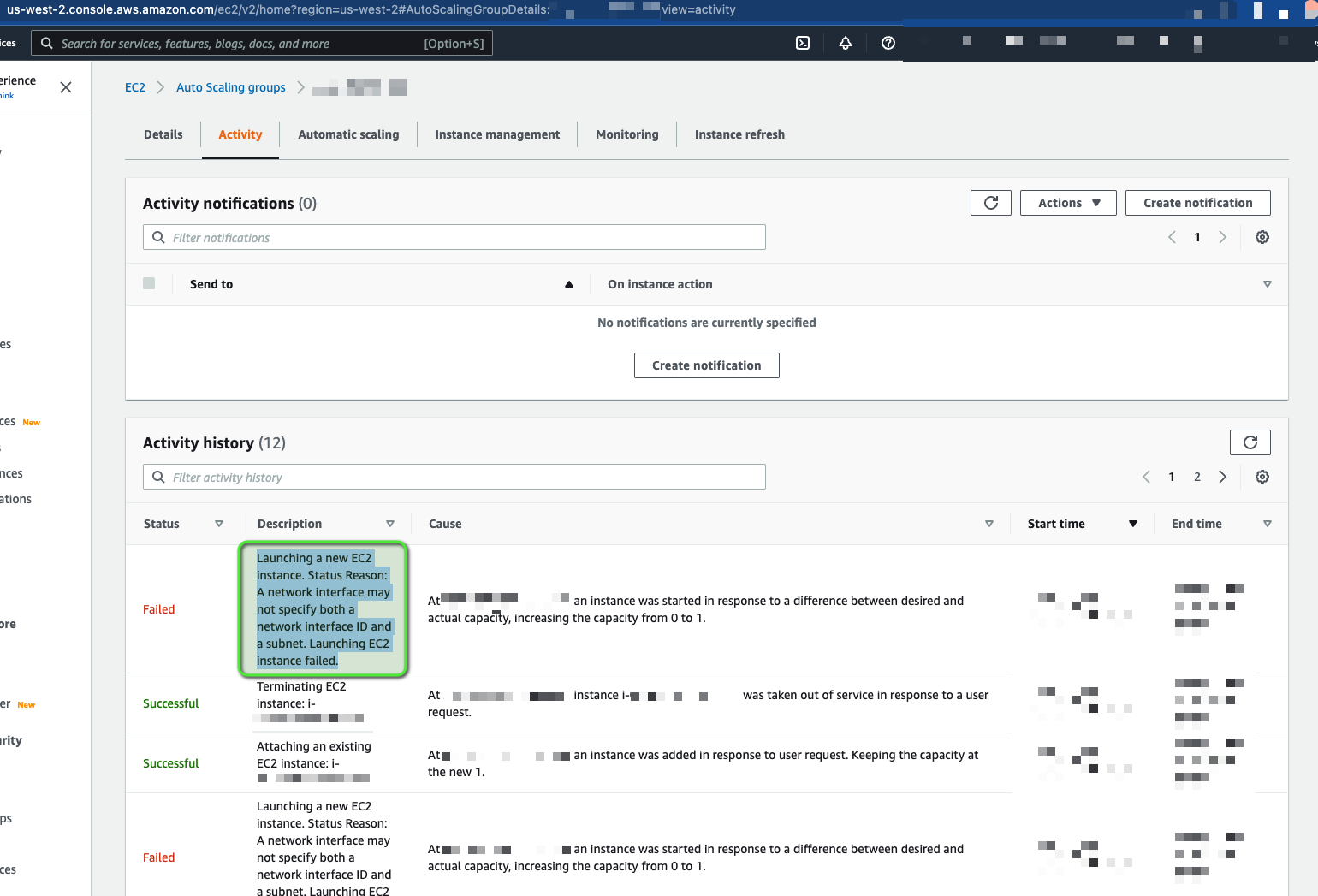
<p>This post will talk about error: <code class="language-plaintext highlighter-rouge">Launching EC2 instance failed. Status Reason:
A network interface may not specify both a network interface ID and a subnet</code>
on an AWS auto scaling group (ASG), see screenshot below:</p>

<p><img src="/assets/images/ASG-no-ENI-and-subnet/00-Error-in-ASG-Activity.png" alt="Error-in-ASG-Activity" /></p>

<h2 id="what-happened">What happened?</h2>

<p>I had recently learned a you can set an
<a href="https://www.pulumi.com/registry/packages/aws/api-docs/ec2/launchtemplate/#network_interfaces_python">ENI ID in a launch template</a>
(this was new information to me).</p>

<p>Before I became aware of this whenever I wanted my EC2 instances to keep the
same private and public IP addresses after replacing said EC2 instances I would
create the Elastic Network Interface (ENI) separately from the launch template
and ASG, allow instances to describe ENIs and attach them to themselves (you
can imagine this turns into a complex IAM policy), have scripts readily
available in the instance to find the ENI, attach it to themselves and make
this ENI the primary network interface.</p>

<p>All the above to say, when I learned I could set the ENI directly into the
launch template I was happy I could simplify my setup. I still needed to create
the ENI outside the launch template and ASG, which I was already doing. This
meant I could update my current stacks and simplify them.</p>

<h3 id="lets-test-in-a-sandbox-environment">Lets test in a sandbox environment</h3>

<p>I updated my pulumi modules and made the new versions available to use.</p>

<p>I apply the changes running <code class="language-plaintext highlighter-rouge">pulumi up -s &lt;my-stack&gt;</code>, I get an error saying
something like cannot use <code class="language-plaintext highlighter-rouge">vpc_zone_identifiers</code> in an ASG that uses a launch
template with assigned ENIs</p>

<p>I change my pulumi modules again and replace <code class="language-plaintext highlighter-rouge">vpc_zone_identifiers</code> with
<code class="language-plaintext highlighter-rouge">availability_zones</code>, made new version available to use.</p>

<p>I apply the changes running <code class="language-plaintext highlighter-rouge">pulumi up -s &lt;my-stack&gt;</code>, this time the change
went through! :D</p>

<p>In this scenario, I was updating an ASG that manages only 1 EC2 instance. I try
to refresh the instance in my ASG and I notice it is taking a while for a new
instance to show up, I decide to go look in <code class="language-plaintext highlighter-rouge">Activity</code> and see the error:</p>

<div class="language-text highlighter-rouge"><div class="highlight"><pre class="highlight"><code>Launching EC2 instance failed. Status Reason:
A network interface may not specify both a network interface ID and a subnet
</code></pre></div></div>

<p><img src="/assets/images/ASG-no-ENI-and-subnet/00-Error-in-ASG-Activity.png" alt="Error-in-ASG-Activity" /></p>

<p>Which reminded me of the error about not being able to use
<code class="language-plaintext highlighter-rouge">vpc_zone_identifiers</code> and I had to replace that parameter with
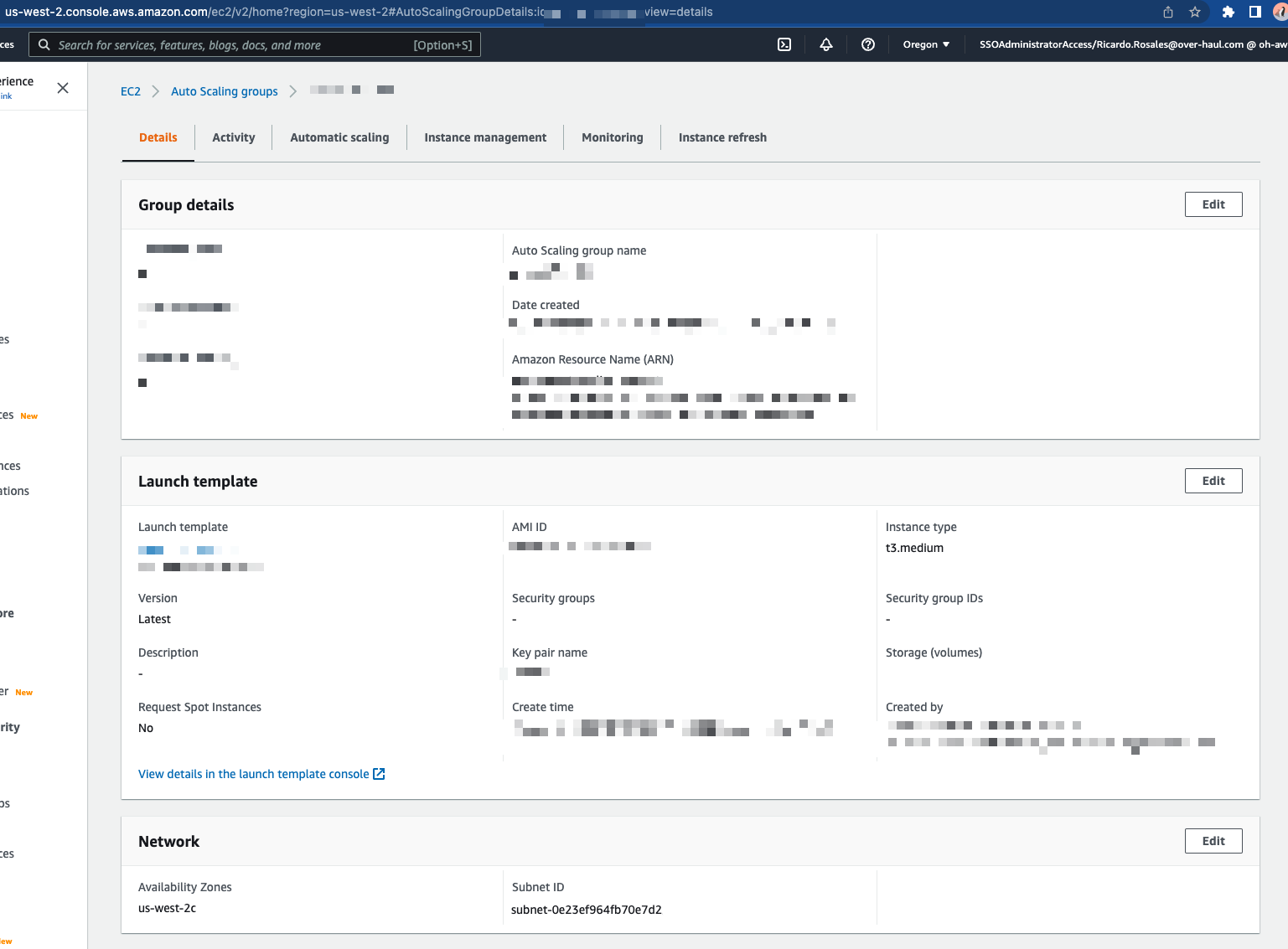
<code class="language-plaintext highlighter-rouge">availability_zones</code>, I looked in the <code class="language-plaintext highlighter-rouge">Details</code> tab and noticed under <code class="language-plaintext highlighter-rouge">Network</code>
I had values in both <code class="language-plaintext highlighter-rouge">Availability Zones</code> and <code class="language-plaintext highlighter-rouge">Subnet ID</code></p>

<p><img src="/assets/images/ASG-no-ENI-and-subnet/01-ASG-With-SubnetID.png" alt="With-Subnet" /></p>

<p>I asked a co-worker for help and they assumed we should be able to wipe the
subnet IDs from the ASG using the <code class="language-plaintext highlighter-rouge">aws</code> cli.</p>

<p>We tried:</p>

<ul>
  <li>Passing only avalability zone without any subnet id, the subnet id stayed</li>
  <li>Passing avalability zone and empty subnet id, threw an error</li>
  <li>Passing avalability zone and <code class="language-plaintext highlighter-rouge">,</code> as the value for subnet id, no error but the
subnet id stayed</li>
  <li>Change subnet id to a subnet id in a different availability zone than the one
we want to use and then pass only the availability zone we want to use, that
threw an error</li>
</ul>

<p>At this point, we assumed the ASG was in a state we would not be able to get it
out from, we decided to replace the ASG</p>

<div class="language-shell highlighter-rouge"><div class="highlight"><pre class="highlight"><code>pulumi up <span class="nt">--replace</span> <span class="s1">'**aws:autoscaling/group:Group::my-stack'</span> <span class="nt">-s</span> &lt;my-stack&gt;
</code></pre></div></div>

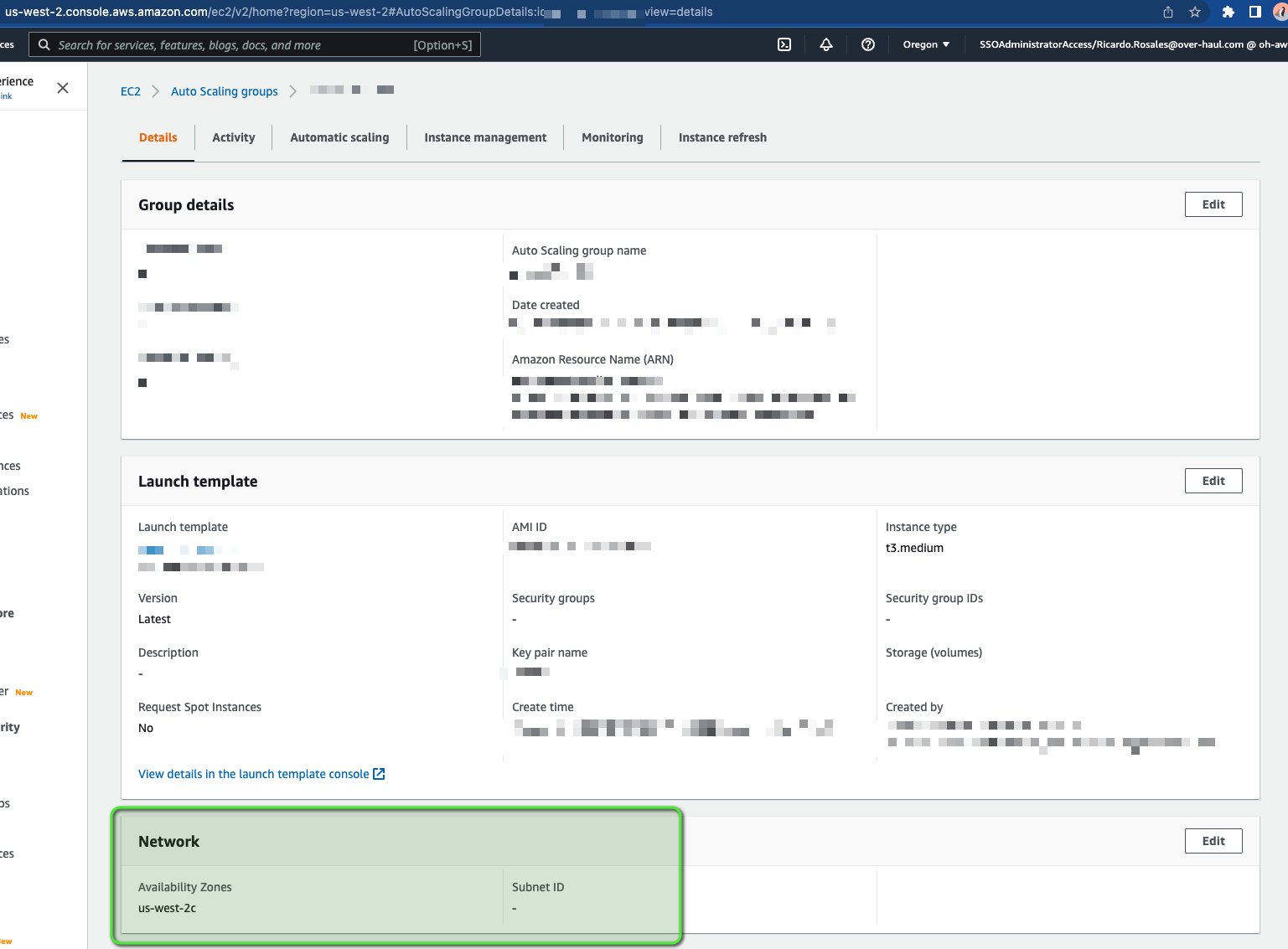
<p>New ASG had values under <code class="language-plaintext highlighter-rouge">Availability Zones</code> and no values under <code class="language-plaintext highlighter-rouge">Subnet ID</code>
and a new instance was provisioned with the same ENI we were using before</p>

<p><img src="/assets/images/ASG-no-ENI-and-subnet/02-ASG-Without-SubnetID.png" alt="Without-Subnet" /></p>]]></content><author><name>Ricardo Rosales</name></author><summary type="html"><![CDATA[Overview]]></summary></entry><entry><title type="html">Deploy Umami website analytics on Heroku via container</title><link href="/umami-container-deploy/" rel="alternate" type="text/html" title="Deploy Umami website analytics on Heroku via container" /><published>2022-07-17T00:00:00+00:00</published><updated>2022-07-17T00:00:00+00:00</updated><id>/umami-container-deploy</id><content type="html" xml:base="/umami-container-deploy/"><![CDATA[<h2 id="requirements">Requirements</h2>

<ul>
  <li><a href="https://heroku.com/">A Heroku Account</a></li>
  <li><a href="https://devcenter.heroku.com/articles/heroku-cli">Heroku CLI</a></li>
  <li>A docker runtime
    <ul>
      <li><a href="https://www.docker.com/products/docker-desktop/">Docker Desktop</a></li>
      <li><a href="https://github.com/docker/cli">docker cli</a> + <a href="https://github.com/abiosoft/colima">colima</a></li>
    </ul>
  </li>
</ul>

<h2 id="initial-app-setup">Initial App Setup</h2>

<ul>
  <li>Login to your <a href="https://heroku.com/">Heroku Account</a></li>
  <li>From the dashboard page click <strong>New &gt; Create new app</strong></li>
  <li>Choose an <strong>App name</strong> and then click <strong>Create app</strong></li>
</ul>

<h3 id="database">Database</h3>

<ul>
  <li>Navigate to the <strong>Resources</strong> tab and click on the <strong>Find more add-ons</strong> button</li>
  <li>Search for <strong>Heroku Postgres</strong> and follow its instructions to install the
add-on</li>
  <li>The add-on will set the <code class="language-plaintext highlighter-rouge">DATABASE_URL</code> automatically; you should not have to
manually set it</li>
  <li>You will need to set up the database tables by following the <strong>Create database
tables</strong> section of the <a href="https://umami.is/docs/install">Install</a> docs</li>
  <li>You can find temporary connection details by following the <strong>Resources &gt;
Heroku Postgres &gt; Settings &gt; Database Credentials</strong> path</li>
</ul>

<h2 id="deploy">Deploy</h2>

<ul>
  <li>Under the <strong>Settings &gt; Config Vars</strong> section, set the <code class="language-plaintext highlighter-rouge">HASH_SALT</code> environment
variable. Read the <a href="https://umami.is/docs/install">Install</a> section for
information about the <code class="language-plaintext highlighter-rouge">HASH_SALT</code> environment variable.</li>
  <li>
    <p>login to heroku cli:</p>

    <div class="language-shell highlighter-rouge"><div class="highlight"><pre class="highlight"><code><span class="nv">$ </span>heroku login
heroku: Press any key to open up the browser to login or q to <span class="nb">exit</span>:
Opening browser to https://cli-auth.heroku.com/auth/cli/browser/
Logging <span class="k">in</span>... <span class="k">done
</span>Logged <span class="k">in </span>your@email.com
</code></pre></div>    </div>
  </li>
  <li>
    <p>docker login to heroku repo</p>

    <div class="language-shell highlighter-rouge"><div class="highlight"><pre class="highlight"><code><span class="nv">$ </span>heroku container:login
Login Succeeded
</code></pre></div>    </div>
  </li>
  <li>
    <p>Pull latest postgresql umami version</p>

    <div class="language-shell highlighter-rouge"><div class="highlight"><pre class="highlight"><code>docker pull docker.umami.is/umami-software/umami:postgresql-v1.33.3
</code></pre></div>    </div>
  </li>
  <li>
    <p>Tag the container image with your app-name and process-type should be <code class="language-plaintext highlighter-rouge">web</code></p>

    <div class="language-shell highlighter-rouge"><div class="highlight"><pre class="highlight"><code>docker tag docker.umami.is/umami-software/umami:postgresql-v1.33.3 <span class="se">\</span>
  registry.heroku.com/&lt;App name&gt;/web
</code></pre></div>    </div>
  </li>
  <li>
    <p>Push the container image to heroku</p>

    <div class="language-shell highlighter-rouge"><div class="highlight"><pre class="highlight"><code>docker push registry.heroku.com/&lt;App name&gt;/web
</code></pre></div>    </div>
  </li>
  <li>
    <p>Create a new release so the new image is promoted</p>

    <div class="language-shell highlighter-rouge"><div class="highlight"><pre class="highlight"><code><span class="nv">$ </span>heroku container:release web <span class="nt">-a</span> &lt;App name&gt;
Releasing images web to &lt;App name&gt;... <span class="k">done</span>
</code></pre></div>    </div>
  </li>
  <li>Once the release has finished, the website should be live. Follow the
<strong>Open app</strong> button at the top of the dashboard to view it</li>
  <li>Follow the <strong>Getting started</strong> guide starting from the
<a href="https://umami.is/docs/login">Login</a> step</li>
</ul>

<h2 id="related-links">Related links</h2>

<ul>
  <li><a href="https://umami.is/docs/running-on-heroku">Umami running on Heroku</a></li>
  <li><a href="https://devcenter.heroku.com/articles/container-registry-and-runtime">Heroku - Docker Deploys</a></li>
</ul>]]></content><author><name>Ricardo Rosales</name></author><summary type="html"><![CDATA[Requirements]]></summary></entry><entry><title type="html">How to VPN connect between Azure and AWS GovCloud Transit Gateway with Managed Services</title><link href="/azure" rel="alternate" type="text/html" title="How to VPN connect between Azure and AWS GovCloud Transit Gateway with Managed Services" /><published>2020-02-05T00:00:00+00:00</published><updated>2020-02-05T00:00:00+00:00</updated><id>/vpn-between-azure-aws</id><content type="html" xml:base="/azure"><![CDATA[<p>I want to thank Jun Kudo for their
<a href="https://hackernoon.com/how-to-connect-between-azure-and-aws-with-managed-services-4b03ec334e8a">post</a>,
this all started learning from their post.</p>

<h2 id="tl-dr">TL; DR</h2>

<p>If you don’t want to read and just want to get it done, go here:
<a href="https://github.com/missingcharacter/janky-stuff/tree/master/cloud/ipsec-between-azure-aws">janky-stuff/cloud/ipsec-between-azure-aws</a></p>

<p>Follow instructions there and run:</p>

<div class="language-shell highlighter-rouge"><div class="highlight"><pre class="highlight"><code><span class="nv">AWS_PROFILE</span><span class="o">=</span>your-profile ./create_ipsec.sh <span class="nt">--azure-cidr</span> &lt;azure CIDR&gt; <span class="se">\</span>
  <span class="nt">--azure-ip</span> &lt;public-ip1&gt; <span class="nt">--azure-ip</span> &lt;public-ip2&gt; <span class="se">\</span>
  <span class="nt">--azure-location</span> eastus <span class="nt">--azure-resource-group</span> &lt;Resource Group&gt; <span class="se">\</span>
  <span class="nt">--aws-cidr</span> &lt;aws CIDR&gt; <span class="nt">--aws-vpc-id</span> &lt;VPC ID&gt;
</code></pre></div></div>

<p>If you want to know details continue reading</p>

<h2 id="assumptions">Assumptions</h2>

<h3 id="aws-side">AWS Side</h3>

<ul>
  <li>You already have VPC(s)/subnets/route tables</li>
  <li>You already have a transit gateway setup with VPCs and/or VPNs</li>
</ul>

<h3 id="azure-side">Azure Side</h3>

<ul>
  <li>You already have a <code class="language-plaintext highlighter-rouge">Virtual Network</code></li>
  <li>You already have a <code class="language-plaintext highlighter-rouge">Gateway Subnet</code></li>
  <li>You already have a <code class="language-plaintext highlighter-rouge">Virtual Network Gateway</code> with a public IP address</li>
</ul>

<p><em>Note:</em> if you don’t already have any resources listed in this section, I
recommend you follow
<a href="https://hackernoon.com/how-to-connect-between-azure-and-aws-with-managed-services-4b03ec334e8a">Jun Kudo’s instructions</a></p>

<h2 id="the-actual-thing">The actual thing</h2>

<h3 id="1-create-customer-gateway">1. Create customer gateway</h3>

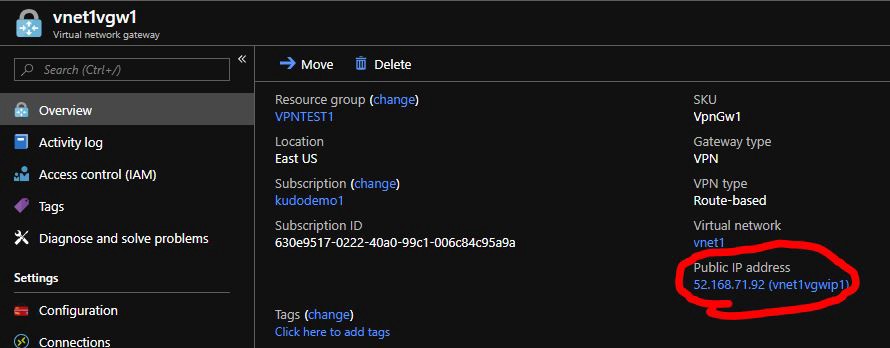
<p>Get the public IP addres for the Azure Virtual Network Gateway:</p>

<p><img src="https://hackernoon.com/hn-images/0*hv7p3c8MsmIV8erW.jpg" alt="Azure-Virtual-Network-GW" /></p>

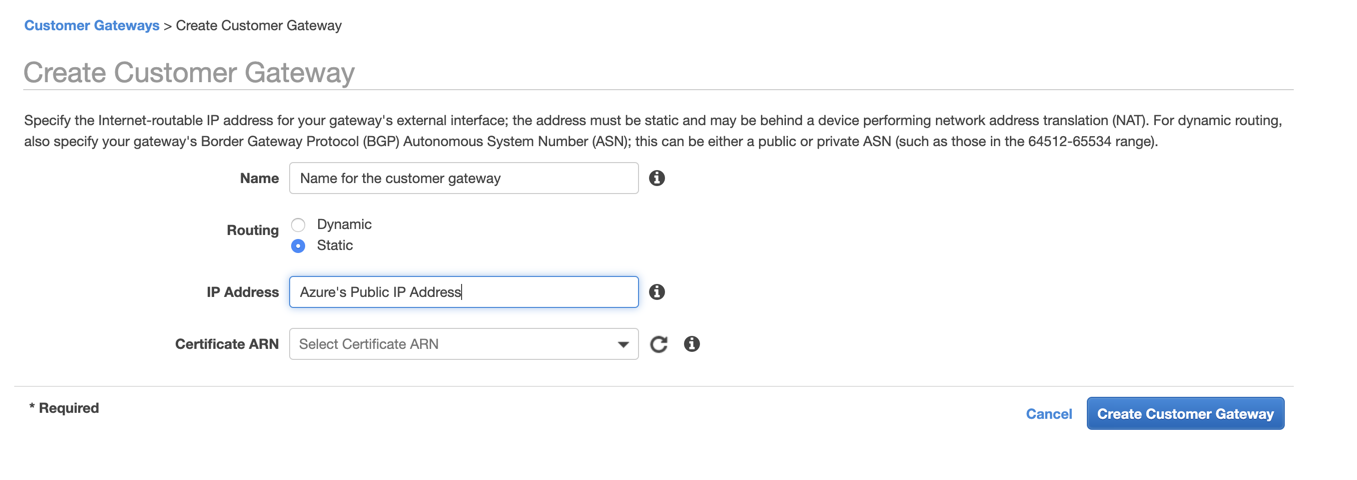
<p>Create a static customer gateway</p>

<p><img src="/assets/images/azure/01-AWS-Create-Customer-Gateway.png" alt="01-AWS-Create-Customer-Gateway" /></p>

<h3 id="2-create-a-vpn-connection">2. Create a VPN Connection</h3>

<table>
  <thead>
    <tr>
      <th>Parameter</th>
      <th>Value</th>
    </tr>
  </thead>
  <tbody>
    <tr>
      <td><code class="language-plaintext highlighter-rouge">Target Gateway Type</code></td>
      <td><code class="language-plaintext highlighter-rouge">Transit Gateway</code> (existing transit gateway)</td>
    </tr>
    <tr>
      <td><code class="language-plaintext highlighter-rouge">Customer Gateway</code></td>
      <td>The one you just created</td>
    </tr>
    <tr>
      <td><code class="language-plaintext highlighter-rouge">Routing Options</code></td>
      <td><code class="language-plaintext highlighter-rouge">Static</code></td>
    </tr>
    <tr>
      <td><code class="language-plaintext highlighter-rouge">Static IP Prefixes</code></td>
      <td>Azure’s Virtual Network CIDR</td>
    </tr>
  </tbody>
</table>

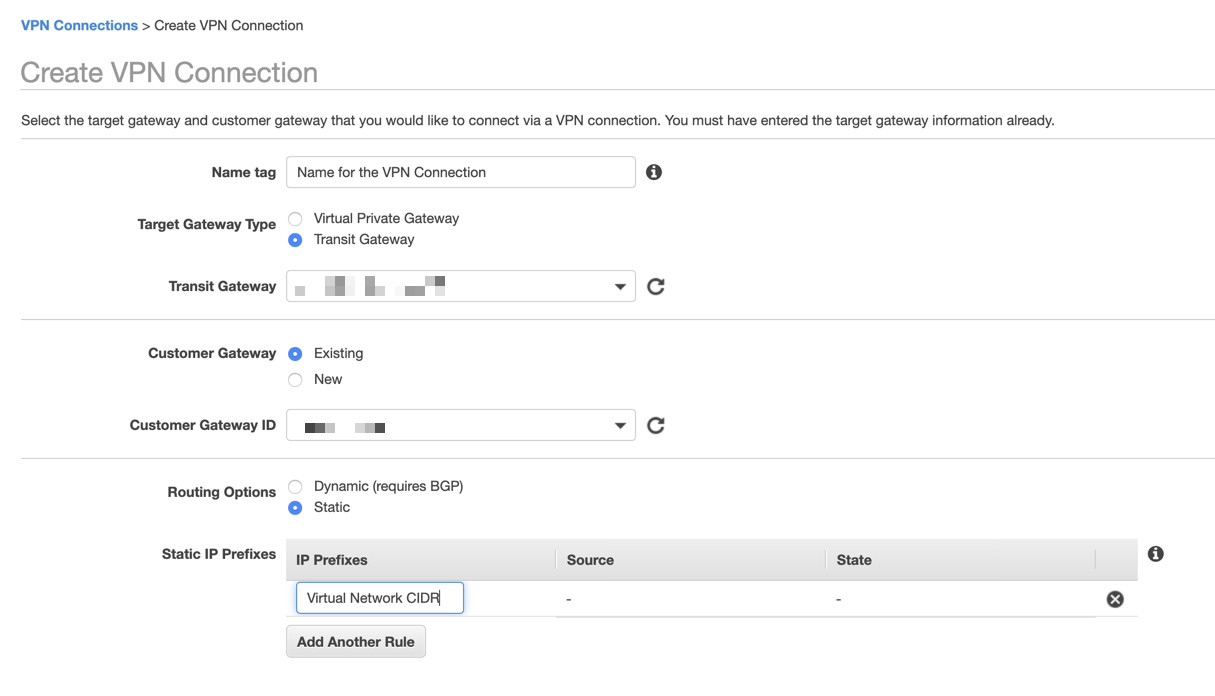
<p><img src="/assets/images/azure/02-Create-VPN-Connection-part-1.png" alt="02-Create-VPN-Connection-part-1" /></p>

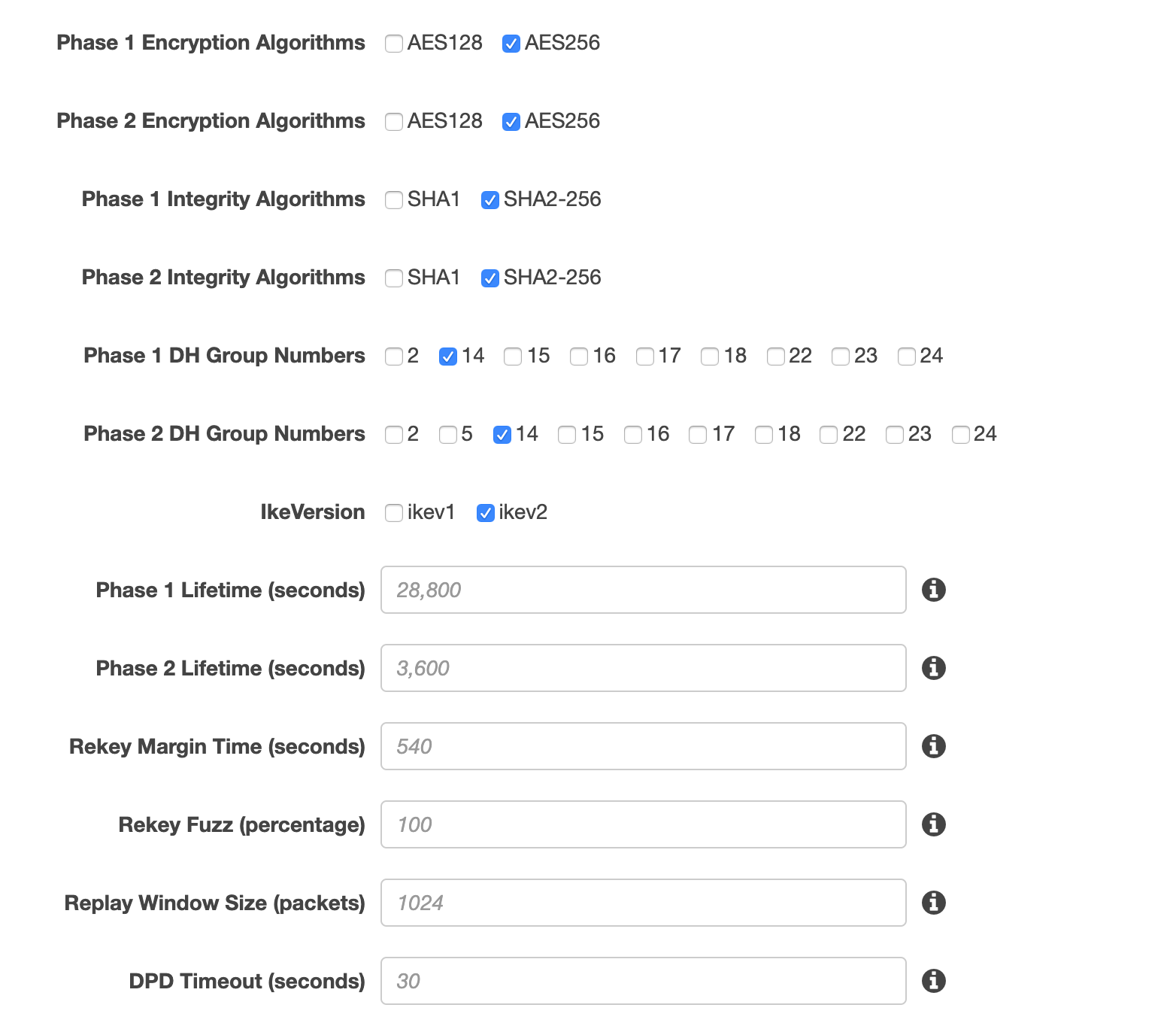
<p>Under <code class="language-plaintext highlighter-rouge">Tunnel Options</code> select <code class="language-plaintext highlighter-rouge">Edit Tunnel 1 Options</code> and
<code class="language-plaintext highlighter-rouge">Edit Tunnel 2 Options</code> and use the options below for both tunnels:</p>

<table>
  <thead>
    <tr>
      <th>Parameter</th>
      <th>Value</th>
    </tr>
  </thead>
  <tbody>
    <tr>
      <td><code class="language-plaintext highlighter-rouge">Phase 1 Encryption Algorithms</code></td>
      <td><code class="language-plaintext highlighter-rouge">AES256</code></td>
    </tr>
    <tr>
      <td><code class="language-plaintext highlighter-rouge">Phase 2 Encryption Algorithms</code></td>
      <td><code class="language-plaintext highlighter-rouge">AES256</code></td>
    </tr>
    <tr>
      <td><code class="language-plaintext highlighter-rouge">Phase 1 Integrity Algorithms</code></td>
      <td><code class="language-plaintext highlighter-rouge">SHA2-256</code></td>
    </tr>
    <tr>
      <td><code class="language-plaintext highlighter-rouge">Phase 2 Integrity Algorithms</code></td>
      <td><code class="language-plaintext highlighter-rouge">SHA2-256</code></td>
    </tr>
    <tr>
      <td><code class="language-plaintext highlighter-rouge">Phase 1 DH Group Numbers</code></td>
      <td><code class="language-plaintext highlighter-rouge">14</code></td>
    </tr>
    <tr>
      <td><code class="language-plaintext highlighter-rouge">Phase 2 DH Group Numbers</code></td>
      <td><code class="language-plaintext highlighter-rouge">14</code></td>
    </tr>
    <tr>
      <td><code class="language-plaintext highlighter-rouge">IkeVersion</code></td>
      <td><code class="language-plaintext highlighter-rouge">ikev2</code></td>
    </tr>
    <tr>
      <td><code class="language-plaintext highlighter-rouge">Phase 1 Lifetime (seconds)</code></td>
      <td><code class="language-plaintext highlighter-rouge">&lt;empty&gt;</code></td>
    </tr>
    <tr>
      <td><code class="language-plaintext highlighter-rouge">Phase 2 Lifetime (seconds)</code></td>
      <td><code class="language-plaintext highlighter-rouge">&lt;empty&gt;</code></td>
    </tr>
    <tr>
      <td><code class="language-plaintext highlighter-rouge">Rekey Margin Time (seconds)</code></td>
      <td><code class="language-plaintext highlighter-rouge">&lt;empty&gt;</code></td>
    </tr>
    <tr>
      <td><code class="language-plaintext highlighter-rouge">Rekey Fuzz (percentage)</code></td>
      <td><code class="language-plaintext highlighter-rouge">&lt;empty&gt;</code></td>
    </tr>
    <tr>
      <td><code class="language-plaintext highlighter-rouge">Replay Window Size (packets)</code></td>
      <td><code class="language-plaintext highlighter-rouge">&lt;empty&gt;</code></td>
    </tr>
    <tr>
      <td><code class="language-plaintext highlighter-rouge">DPD Timeout (seconds)</code></td>
      <td><code class="language-plaintext highlighter-rouge">&lt;empty&gt;</code></td>
    </tr>
  </tbody>
</table>

<p><img src="/assets/images/azure/GovCloud-Tunnel-Options.png" alt="GovCloud-Tunnel-Options" /></p>

<h3 id="3-obtain-pre-shared-key-and-public-ips">3. Obtain Pre-Shared Key and Public IPs</h3>

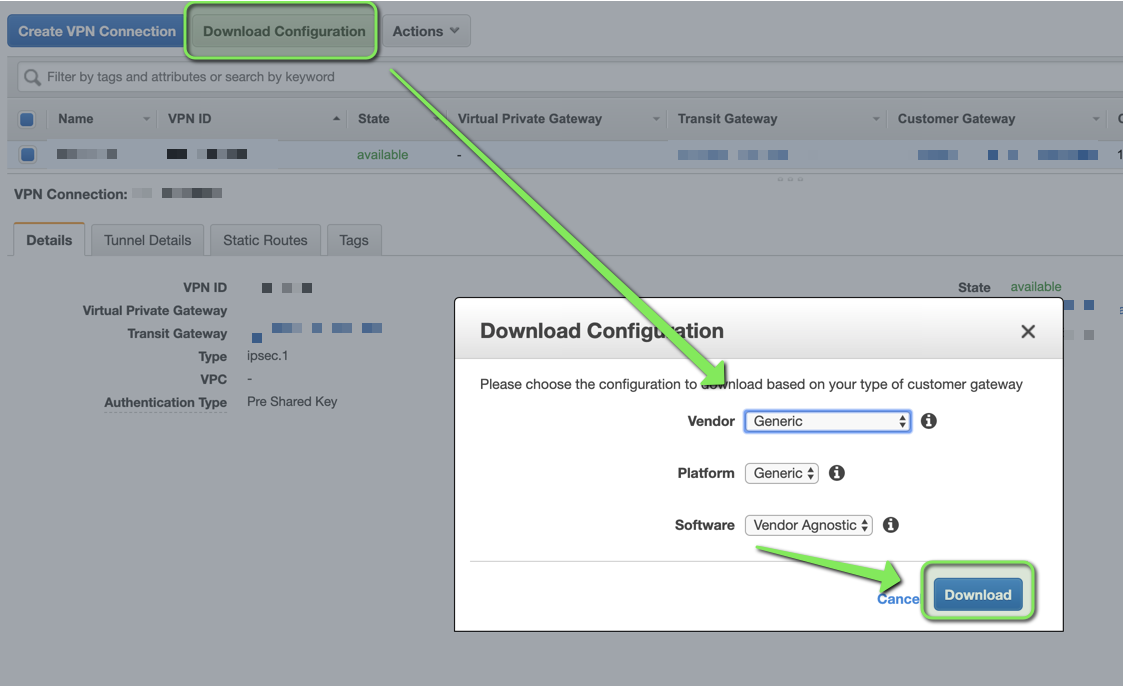
<p>After the VPN is created, download its configuration.</p>

<p><img src="/assets/images/azure/03-Download-VPN-Config.png" alt="03-Download-VPN-Config" /></p>

<p>This file will have 2 Pre-Shared Keys, 1 per tunnel.</p>

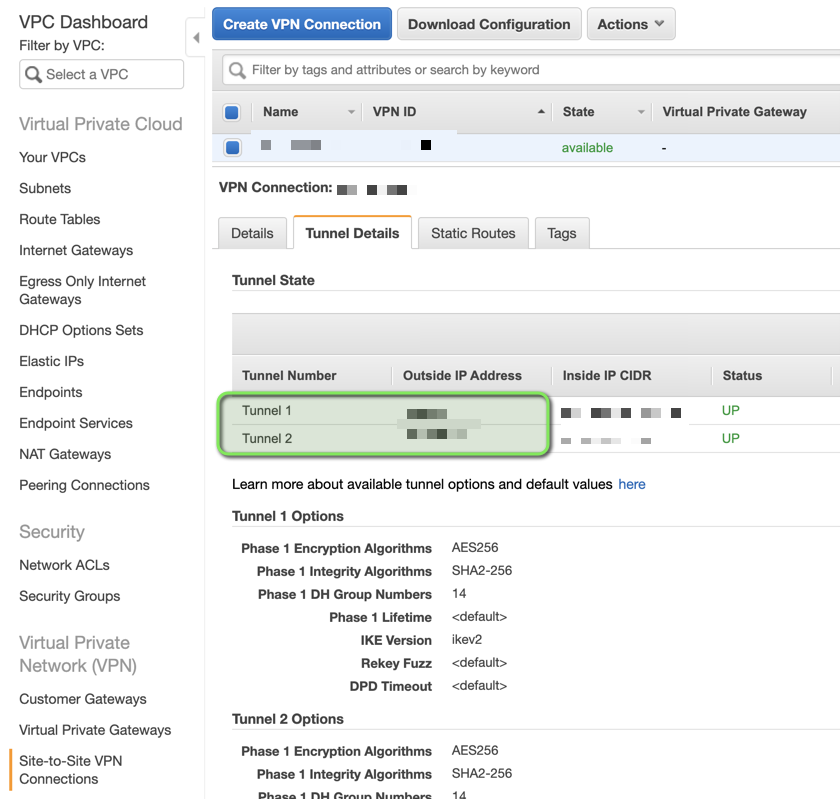
<p>Public IPs will be in <code class="language-plaintext highlighter-rouge">Tunnel Details</code></p>

<p><img src="/assets/images/azure/05-AWS-VPN-Public-IP-Address.png" alt="05-AWS-VPN-Public-IP-Address" /></p>

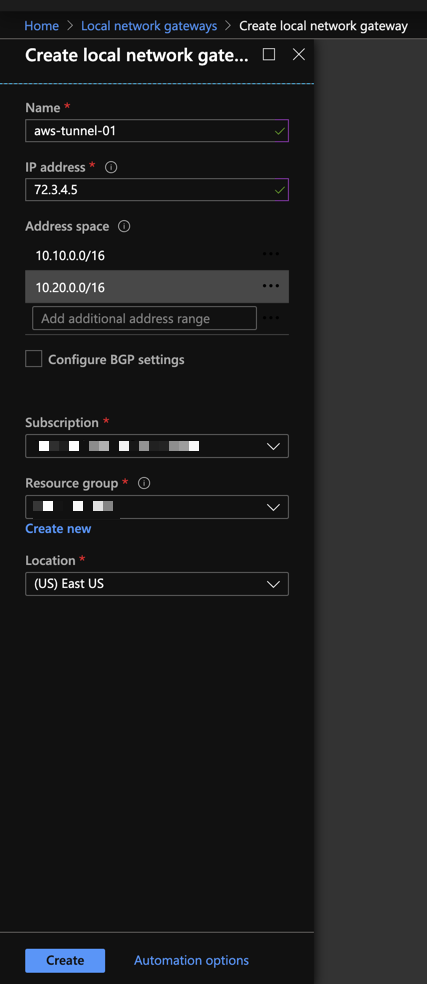
<h3 id="4-create-local-network-gateways">4. Create Local Network Gateways</h3>

<p>Create 1 Local Network Gateway per Tunnel, with the settings below:</p>

<!-- markdownlint-disable MD013 -->

<table>
  <thead>
    <tr>
      <th>Local Network Gateway</th>
      <th>IP Address</th>
      <th>Address Space</th>
    </tr>
  </thead>
  <tbody>
    <tr>
      <td><code class="language-plaintext highlighter-rouge">aws-tunnel-01</code></td>
      <td>Outside IP Address for tunnel 1</td>
      <td>AWS CIDRs you want Azure to have access to</td>
    </tr>
    <tr>
      <td><code class="language-plaintext highlighter-rouge">aws-tunnel-02</code></td>
      <td>Outside IP Address for tunnel 2</td>
      <td>AWS CIDRs you want Azure to have access to</td>
    </tr>
  </tbody>
</table>

<!-- markdownlint-enable MD013 -->

<p><img src="/assets/images/azure/06-Azure-Create-Local-Network-Gateway.png" alt="06-Azure-Create-Local-Network-Gateway" /></p>

<p><em>Note</em>: <code class="language-plaintext highlighter-rouge">aws-tunnel-01</code> and <code class="language-plaintext highlighter-rouge">aws-tunnel-02</code> are suggested names, you may use
whatever nomenclature you prefer.</p>

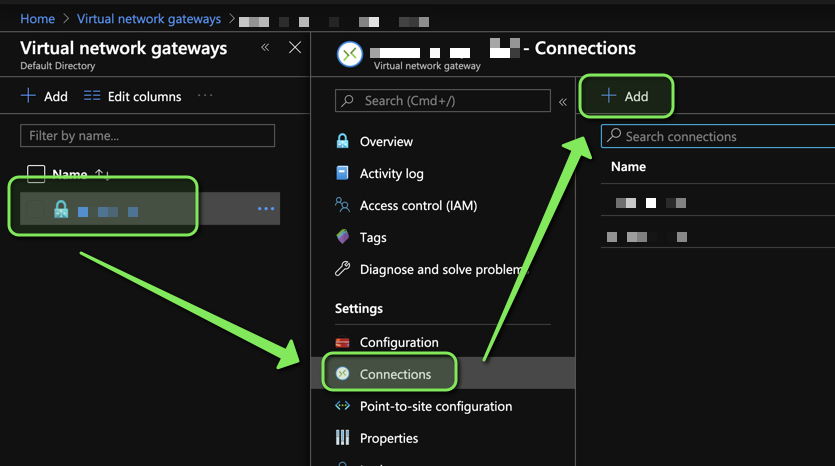
<h3 id="5-create-connections">5. Create Connections</h3>

<p>Go to your existing <code class="language-plaintext highlighter-rouge">Virtual Network Gateway</code> in Azure and add 1 connection per
Tunnel:</p>

<p><img src="/assets/images/azure/07-Azure-Create-Connections.png" alt="07-Azure-Create-Connections" /></p>

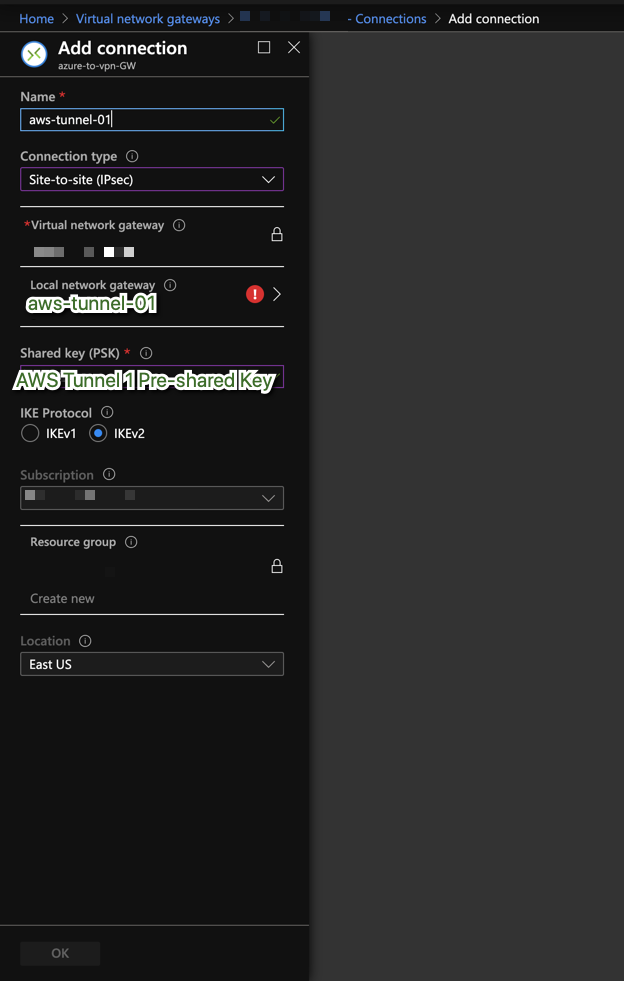
<p>Settings should be similar to the ones below:</p>

<!-- markdownlint-disable MD013 -->

<table>
  <thead>
    <tr>
      <th>Connection Name</th>
      <th>Connection Type</th>
      <th>Local Network Gateway</th>
      <th>Pre-Shared Key</th>
    </tr>
  </thead>
  <tbody>
    <tr>
      <td><code class="language-plaintext highlighter-rouge">aws-tunnel-01</code></td>
      <td>Site-to-site (IPsec)</td>
      <td><code class="language-plaintext highlighter-rouge">aws-tunnel-01</code></td>
      <td>key for tunnel1</td>
    </tr>
    <tr>
      <td><code class="language-plaintext highlighter-rouge">aws-tunnel-02</code></td>
      <td>Site-to-site (IPsec)</td>
      <td><code class="language-plaintext highlighter-rouge">aws-tunnel-02</code></td>
      <td>key for tunnel2</td>
    </tr>
  </tbody>
</table>

<!-- markdownlint-enable MD013 -->

<p><img src="/assets/images/azure/08-Azure-Connection.png" alt="08-Azure-Connection" /></p>

<p><em>Note</em>: <code class="language-plaintext highlighter-rouge">aws-tunnel-01</code> and <code class="language-plaintext highlighter-rouge">aws-tunnel-02</code> are suggested names, you may use
whatever nomenclature you prefer.</p>

<h3 id="6-configure-azure-connections-ipsec-policy">6. Configure Azure Connections IPSec Policy</h3>

<p>I couldn’t find the following in the Azure Web Console, so I performed it using
the cli.</p>

<h3 id="7-repeat-this-process-per-connection">7. Repeat this process per connection</h3>

<h4 id="connection-has-no-ipsec-policy">Connection has no IPSec policy</h4>

<div class="language-shell highlighter-rouge"><div class="highlight"><pre class="highlight"><code><span class="nv">$ </span>az network vpn-connection ipsec-policy list <span class="se">\</span>
  <span class="nt">--resource-group</span> &lt;Your Resource Group&gt; <span class="nt">--connection-name</span> &lt;Connection Name&gt;
<span class="o">[]</span>
</code></pre></div></div>

<h4 id="add-ipsec-policy-to-connection">Add IPSec policy to connection</h4>

<div class="language-shell highlighter-rouge"><div class="highlight"><pre class="highlight"><code>az network vpn-connection ipsec-policy add <span class="se">\</span>
  <span class="nt">--resource-group</span> &lt;Your Resource Group&gt; <span class="nt">--connection-name</span> &lt;Connection Name&gt; <span class="se">\</span>
  <span class="nt">--dh-group</span> DHGroup14 <span class="nt">--ike-encryption</span> AES256 <span class="nt">--ike-integrity</span> SHA256 <span class="se">\</span>
  <span class="nt">--ipsec-encryption</span> AES256 <span class="nt">--ipsec-integrity</span> SHA256 <span class="nt">--pfs-group</span> PFS2048 <span class="se">\</span>
  <span class="nt">--sa-lifetime</span> 3600 <span class="nt">--sa-max-size</span> 1024
</code></pre></div></div>

<h4 id="verify-connection-has-ipsec-policy">Verify Connection has IPSec Policy</h4>

<div class="language-shell highlighter-rouge"><div class="highlight"><pre class="highlight"><code><span class="nv">$ </span>az network vpn-connection ipsec-policy list <span class="se">\</span>
  <span class="nt">--resource-group</span> &lt;Your Resource Group&gt; <span class="nt">--connection-name</span> &lt;Connection Name&gt;
<span class="o">[</span>
  <span class="o">{</span>
    <span class="s2">"dhGroup"</span>: <span class="s2">"DHGroup14"</span>,
    <span class="s2">"ikeEncryption"</span>: <span class="s2">"AES256"</span>,
    <span class="s2">"ikeIntegrity"</span>: <span class="s2">"SHA256"</span>,
    <span class="s2">"ipsecEncryption"</span>: <span class="s2">"AES256"</span>,
    <span class="s2">"ipsecIntegrity"</span>: <span class="s2">"SHA256"</span>,
    <span class="s2">"pfsGroup"</span>: <span class="s2">"PFS2048"</span>,
    <span class="s2">"saDataSizeKilobytes"</span>: 1024,
    <span class="s2">"saLifeTimeSeconds"</span>: 3600
  <span class="o">}</span>
<span class="o">]</span>
</code></pre></div></div>

<p><em>Note</em>:
<a href="https://docs.microsoft.com/en-us/cl/assets/images/azure/install-azure-cli?view=azure-cli-latest">Azure CLI page</a></p>

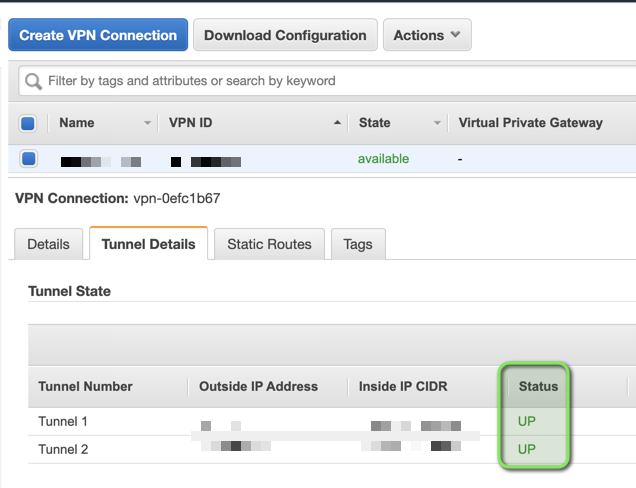
<h3 id="7-tunnels-should-be-up">7. Tunnels should be up</h3>

<h4 id="aws">AWS</h4>

<p><img src="/assets/images/azure/09-AWS-Tunnels-UP.png" alt="09-AWS-Tunnels-UP" /></p>

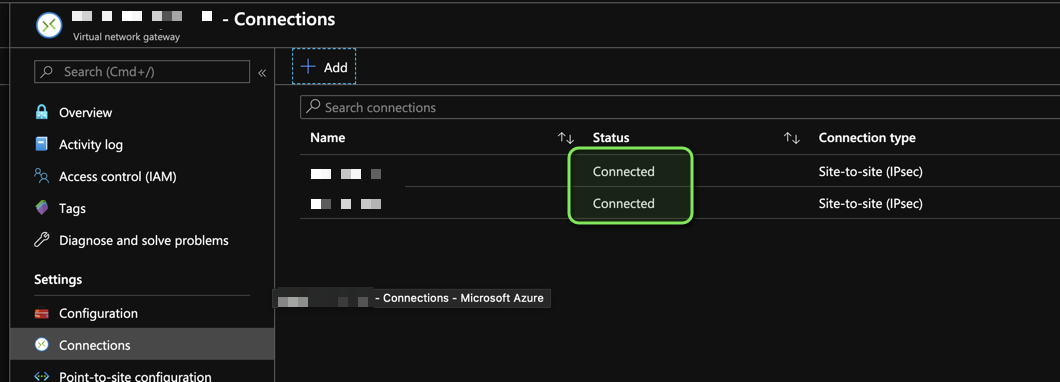
<h4 id="azure">Azure</h4>

<p><img src="/assets/images/azure/10-Azure-Connections-UP.png" alt="10-Azure-Connections-UP" /></p>

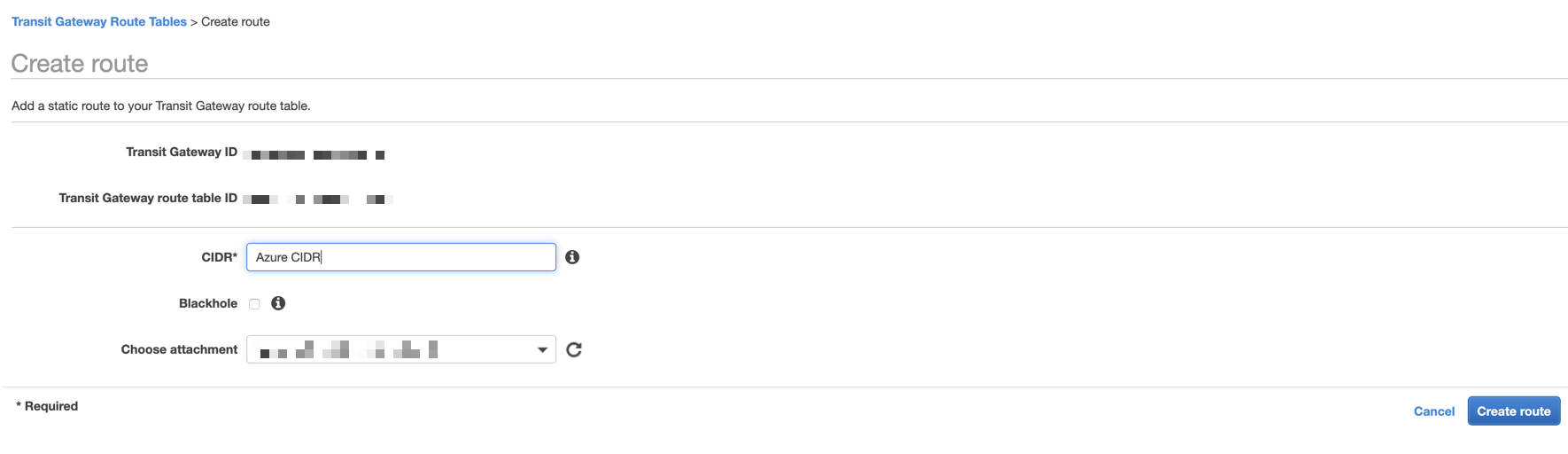
<h3 id="8-add-azure-cidrs-to-transit-gateway-route-table">8. Add Azure CIDR(s) to Transit Gateway Route Table</h3>

<p>At this point Azure Resources within the <code class="language-plaintext highlighter-rouge">Virtual Network</code> associated to your
<code class="language-plaintext highlighter-rouge">Virtual Network Gateway</code> know about AWS CIDRs, thanks to
<code class="language-plaintext highlighter-rouge">Local Network Gateway</code>s.</p>

<p>Add Azure CIDRs to Transit Gateway Route Table:</p>

<p><img src="/assets/images/azure/12-AWS-Transit-Gateway-Route-Table-AzureCIDR.png" alt="12-AWS-Transit-Gateway-Route-Table-AzureCIDR" /></p>

<h3 id="9-add-azure-cidrs-to-aws-vpc-route-tables">9. Add Azure CIDR(s) to AWS VPC Route tables</h3>

<p>Now add Azure CIDRs to AWS VPC Route Tables and point them to the transit
gateway</p>

<h3 id="10-youre-done">10. You’re done</h3>

<p>Let me know if you know of a better way to do this!</p>

<h2 id="notes">Notes</h2>

<h3 id="bgp-issues">BGP Issues</h3>

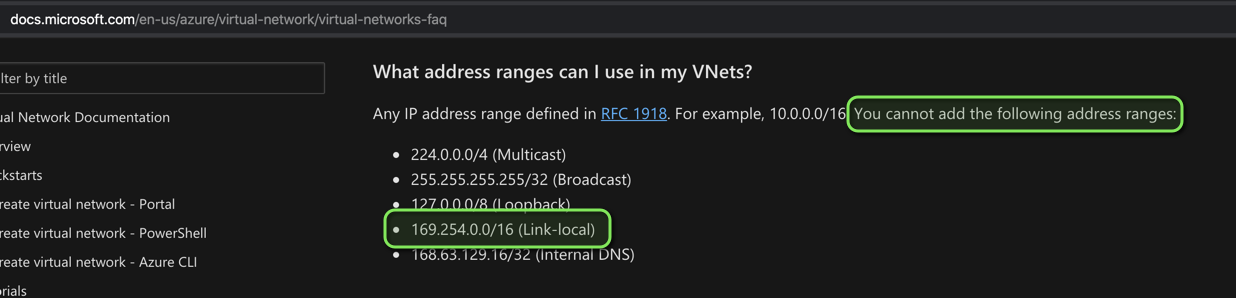
<p>As of February 4, 2020. BGP peering seems to not be possible between AWS and
Azure due a conflict with <code class="language-plaintext highlighter-rouge">169.254.0.0/16</code>, Azure specifically states it does
not allow this range in their
<a href="https://docs.microsoft.com/en-u/assets/images/azure/virtual-network/virtual-networks-faq">virtual network</a></p>

<p><img src="/assets/images/azure/00-Azure-reserved.png" alt="00-Azure-reserved" /></p>

<p>On the AWS side, <code class="language-plaintext highlighter-rouge">169.254.0.0/16</code> is used as the <code class="language-plaintext highlighter-rouge">Inside IP CIDR</code> in a
<code class="language-plaintext highlighter-rouge">VPN Connection</code>.
At least someone provided feedback to Azure on how to improve their Networking,
see
<a href="https://feedback.azure.com/forums/217313-networking/suggestions/38286799-ability-to-connection-azure-virtual-network-gatewa">azure feedback</a></p>

<p>If someone figures out how to setup BGP between Azure and AWS, please let me
know.</p>

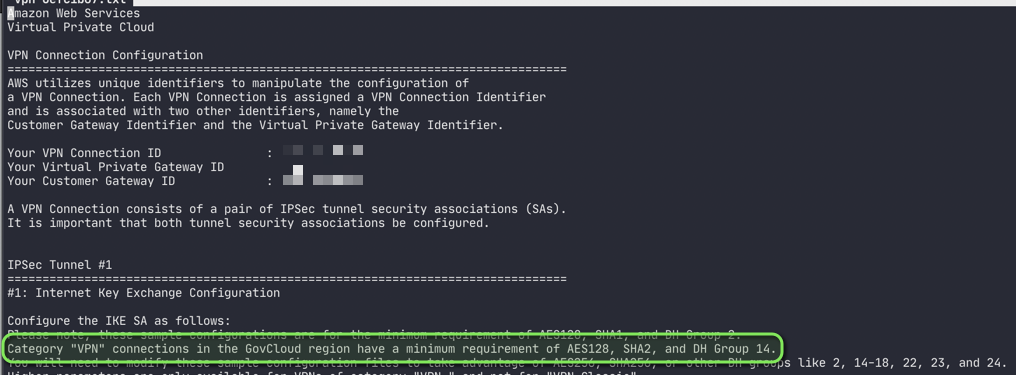
<h3 id="govcloud-vpn-minimum-requirements">GovCloud VPN minimum requirements</h3>

<p>You’ll know them after you download the VPN’s configuration:</p>

<div class="language-text highlighter-rouge"><div class="highlight"><pre class="highlight"><code>Category "VPN" connections in the GovCloud region have a minimum requirement of
AES128, SHA2, and DH Group 14.
</code></pre></div></div>

<p><img src="/assets/images/azure/04-Category-VPN-min-reqs.png" alt="04-Category-VPN-min-reqs" /></p>

<h3 id="virtual-network-gateway-healthprobe">Virtual Network Gateway Healthprobe</h3>

<p>Azure offers a healthprobe for <code class="language-plaintext highlighter-rouge">Virtual Network Gateway</code>s that follows this
format <code class="language-plaintext highlighter-rouge">https://&lt;Public IP Address of your Virtual Network Gateway&gt;:8081</code></p>

<p><img src="/assets/images/azure/11-Azure-Virtual-Network-Gateway-Healthprobe.png" alt="11-Azure-Virtual-Network-Gateway-Healthprobe" /></p>

<h3 id="troubleshooting-tunnels">Troubleshooting Tunnels</h3>

<p>AWS gives no logs for their VPN Connections they only
<a href="https://docs.aws.amazon.com/vpn/latest/s2svpn/monitoring-cloudwatch-vpn.html">provide metrics</a>
for them.</p>

<p>Azure on the other hand gives you some indicators in the connection’s
<code class="language-plaintext highlighter-rouge">Resource health</code> section:</p>

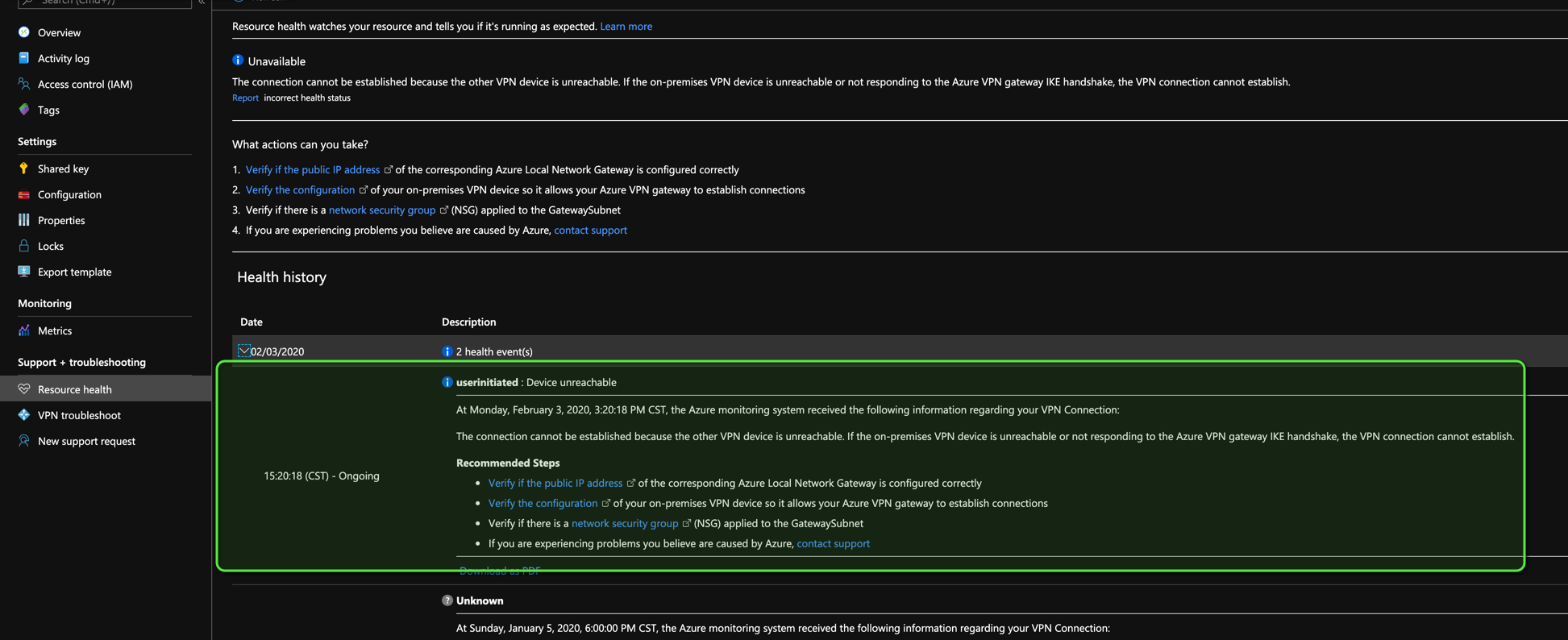
<h4 id="mismatched-ike-version-showed-this-message-on-azure">Mismatched IKE version showed this message on Azure</h4>

<p><img src="/assets/images/azure/Azure-VPN-wrong-IKE-version.png" alt="Azure-VPN-wrong-IKE-version" /></p>

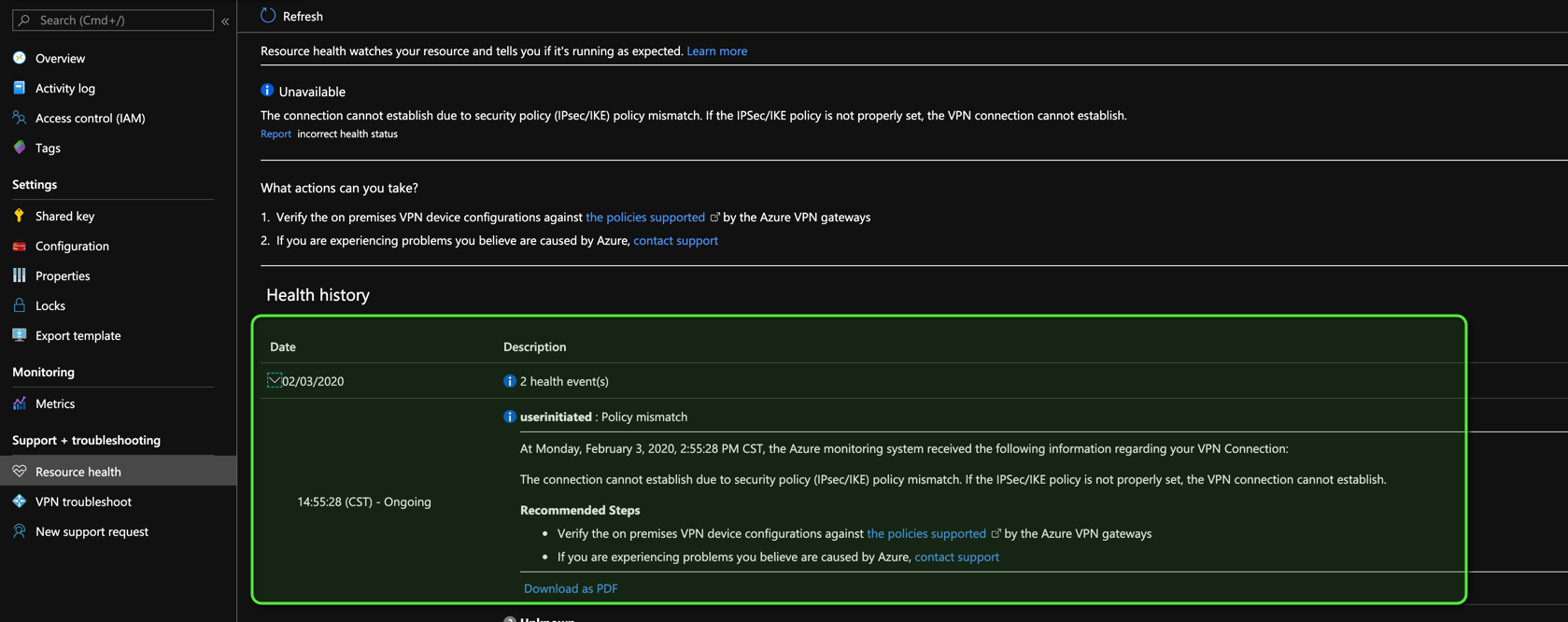
<h4 id="mismatched-algorithms-showed-this-message-on-azure">Mismatched algorithms showed this message on Azure</h4>

<p><img src="/assets/images/azure/Azure-VPN-wrong-algorithms.png" alt="Azure-VPN-wrong-algorithms" /></p>]]></content><author><name>Ricardo Rosales</name></author><category term="azure" /><category term="transit-gateway" /><category term="govcloud" /><category term="aws" /><summary type="html"><![CDATA[I want to thank Jun Kudo for their post, this all started learning from their post.]]></summary></entry><entry><title type="html">Make impostor syndrome your best friend</title><link href="/make-impostor-syndrome-your-best-friend/" rel="alternate" type="text/html" title="Make impostor syndrome your best friend" /><published>2018-03-14T00:00:00+00:00</published><updated>2018-03-14T00:00:00+00:00</updated><id>/make-impostor-syndrome-your-best-friend</id><content type="html" xml:base="/make-impostor-syndrome-your-best-friend/"><![CDATA[<p>If you are like me, a lot of times you doubt yourself and how capable you are
at doing your job, no matter how hard you have pushed yourself, no matter how
much anyone has told you how good you are.</p>

<p>You could be like:</p>

<div class="language-text highlighter-rouge"><div class="highlight"><pre class="highlight"><code>"Hey guys, I did this thing because I was asked to do X,
but I recognized the person's problem was Y, so I just went ahead and made
something that helps this person but could also help more people and that is
why I'm telling you guys about it"
</code></pre></div></div>

<p>People see it</p>

<p>People tell you:</p>

<div class="language-text highlighter-rouge"><div class="highlight"><pre class="highlight"><code>"This is so awesome, I never thought about this in this way, YOU ARE SO AWESOME"
</code></pre></div></div>

<p>You hear this and then impostor syndrome kicks in and tells you all the things
that are wrong with your approach and all the time it will take you to make
something that is better</p>

<p>Then you start telling people how awful your thing is because you just now
realized how terrible it is.</p>

<p>If I am describing something you’ve felt, I’ve felt it too, you are not alone.</p>

<p>For the longest time, I thought impostor syndrome was an asshole who didn’t
wanted me to ever be happy about anything I did or accomplished, but I was
wrong.</p>

<p>I never took the time to actually think through what my impostor syndrome was
actually trying to tell me.</p>

<div class="language-text highlighter-rouge"><div class="highlight"><pre class="highlight"><code>"Hey, dude. Set expectations, communicate clearly, it might be a good idea to
tell people the use cases in which your thing may not work or the time/effort it
would/will take to make your thing do what they want."
</code></pre></div></div>

<p>My impostor syndrome, was trying to make me a better engineer, but I never
allowed it to take over and let it <code class="language-plaintext highlighter-rouge">"drive"</code> for a little bit. See things from
his point of view.</p>

<p>I never actually realized that the impostor syndrome WAS ME.</p>

<p>Me trying to be better.
Me trying to get better.
Me trying to improve.
Me trying to empathize with someone.
Me trying to be selfless and helpful.
Me trying to work better with others.
Me trying SO HARD TO MAKE PEOPLE SEE ME THE SAME WAY I SEE MYSELF.</p>

<p>But now after much thought, I realized I was focusing on the wrong things. I
didn’t see the pattern. The pattern was:</p>

<h3 id="me-trying">Me trying</h3>

<p>I never took the time to step back and actually see all the things I’ve achieved
because I want to be something more, because I want to improve, because I want
to belong, because I want to have a purpose.</p>

<p>But my impostor syndrome knew all this, my impostor syndrome was right there
with me, I was never alone in this journey. I always had someone else’s
perspective but I never gave my impostor syndrome a chance.</p>

<p>I would like to finish this post with this:</p>

<p><code class="language-plaintext highlighter-rouge">"Give your impostor syndrome a chance, listen to him/her, it is a part of you"</code></p>

<p>Thanks for reading.</p>]]></content><author><name>Ricardo Rosales</name></author><summary type="html"><![CDATA[If you are like me, a lot of times you doubt yourself and how capable you are at doing your job, no matter how hard you have pushed yourself, no matter how much anyone has told you how good you are.]]></summary></entry><entry><title type="html">Why I liked “Diet Cig” so much</title><link href="/why-i-liked-diet-cig-so-much/" rel="alternate" type="text/html" title="Why I liked “Diet Cig” so much" /><published>2018-03-14T00:00:00+00:00</published><updated>2018-03-14T00:00:00+00:00</updated><id>/why-i-liked-diet-cig-so-much</id><content type="html" xml:base="/why-i-liked-diet-cig-so-much/"><![CDATA[<h2 id="it-was-1-sentence">It was 1 sentence</h2>

<p><code class="language-plaintext highlighter-rouge">It's hard to be a punk while wearing a skirt</code> from their song
<a href="https://www.youtube.com/watch?v=ePnrP7sIH_c">“tummy ache”</a></p>

<p>This sentence made so many things click for me.</p>

<p>In high school, I just wanted to attend a lot of punk rock concerts from local
bands In Mexicali, Baja California, Mexico. I remember a lot of my female
friends will be <code class="language-plaintext highlighter-rouge">"too pushy"</code> or <code class="language-plaintext highlighter-rouge">"annoying"</code> for asking us (their male friends)
to be at the concert first, or that we picked them up at their home and then go
to the event.</p>

<p>I clearly remember being the idiot telling them shit like:</p>

<div class="language-text highlighter-rouge"><div class="highlight"><pre class="highlight"><code>"it doesn't seem fair we have pick you up"
</code></pre></div></div>

<div class="language-text highlighter-rouge"><div class="highlight"><pre class="highlight"><code>"it doesn't seem fair you always want us (male friends) to be there first before
showing up"
</code></pre></div></div>

<p>I’m a little sad to say that until now, that I’m in my thirties, just realized
how much of an idiot I was. I was missing the context of them being girls in a
Mexican city, of course they were not comfortable with other males they didn’t
know. I didn’t know about the problems society had with them being high school
girls dressing the way we <code class="language-plaintext highlighter-rouge">"punks"</code> dressed like, showing skin, skirts, jeans
with holes, looking like we didn’t take a bath, among other things.</p>

<p>Anyways, this may not have a lot to do with what the song was about, but it
really touched my heart.</p>

<p>Thanks <a href="https://dietcig.bandcamp.com/">Diet Cig</a>!</p>]]></content><author><name>Ricardo Rosales</name></author><summary type="html"><![CDATA[It was 1 sentence]]></summary></entry><entry><title type="html">Recovering F7D7302 using serial</title><link href="/recovering-F7D7302-using-serial/" rel="alternate" type="text/html" title="Recovering F7D7302 using serial" /><published>2014-02-09T00:00:00+00:00</published><updated>2014-02-09T00:00:00+00:00</updated><id>/recovering-F7D7302-using-serial</id><content type="html" xml:base="/recovering-F7D7302-using-serial/"><![CDATA[<p>Last year, I was trying to help a friend change his router’s firmware (Belkin
Share N300 Wireless N+ Router MiMo 3D &amp; USB Port) to DD-WRT, he tried first and
something didn’t work like it should and asked me for help, because I’ve been
succesful to make DD-WRT work in other 2 routers (WRT54GL &amp; F7D7301).</p>

<p>After a couple hours I suggested my friend we used
<a href="http://tomatousb.org/">tomato firmware</a> instead of DD-WRT becuase tomato has a
friendlier interface.</p>

<h3 id="yeah-right">Yeah, right</h3>

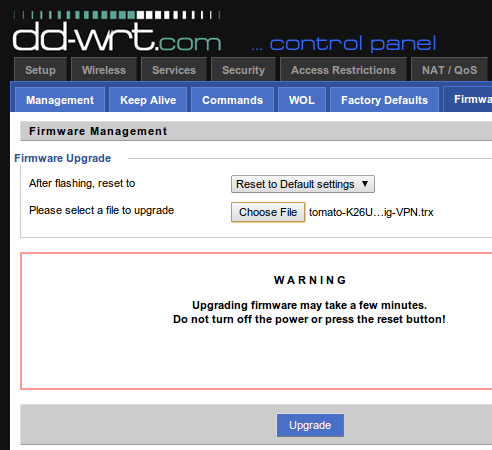
<p>He accepted and I flashed tomato, I swear I selected to “Reset to default
settings”</p>

<p><img src="/assets/images/recovering/01___upgrade_firmware.png" alt="dd-wrt Firmware upgrade" /></p>

<p>The problem was that the router stopped working, I have just made a beautiful
plastic brick :(</p>

<p>Tried several times the
<a href="http://www.dd-wrt.com/wiki/index.php/Hard_reset_or_30/30/30">30/30/30 reset</a>
and it didn’t work. We finally gave up on the router and decided to work on it
later.</p>

<h3 id="gettin-jiggy-wit-it">Gettin’ Jiggy wit It</h3>

<p>Well, until the past weekend I had the oportunity to look further into this
issue, thanks to
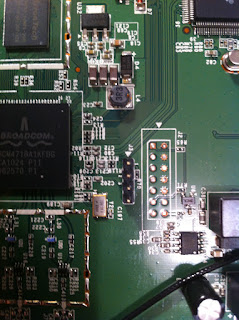
<a href="https://www.blogger.com/profile/06759040624540828619">Scott Gibson</a> I was able
to confirm the router’s serial port:</p>

<p><img src="http://3.bp.blogspot.com/-nIDbLdqE8lc/Tj0lqUDacbI/AAAAAAAACFg/Y3Vg35mrcnU/s320/image+%25281%2529.jpeg" alt="F7D7302 Serial port" /></p>

<p>Pin 1: Vcc (3.3V)
Pin 2: RX
Pin 3: TX
Pin 4: Gnd</p>

<p>Thanks to <a href="http://tweakers.net/gallery/247680">Gtoniser</a> and their
<a href="http://appventures.tweakblogs.net/blog/8736/unbricking-your-router-with-a-raspberry-pi.html">post</a>
I had the information on how to connect the Raspberry Pi and the router’s serial.</p>

<h3 id="setup-the-pi">Setup the Pi</h3>

<p>First, You have to comment the following line in <code class="language-plaintext highlighter-rouge">/etc/inittab</code></p>

<div class="language-shell highlighter-rouge"><div class="highlight"><pre class="highlight"><code>T0:23:respawn:/sbin/getty <span class="nt">-L</span> ttyAMA0 115200 vt100
</code></pre></div></div>

<p>it should look like this:</p>

<div class="language-shell highlighter-rouge"><div class="highlight"><pre class="highlight"><code>T0:23:respawn:/sbin/getty <span class="nt">-L</span> ttyAMA0 115200 vt100
</code></pre></div></div>

<p>Reboot the RPi and now we can use the serial port.</p>

<h3 id="how-to-connect-the-rpi">How to connect the RPi</h3>

<p>Thanks to
<a href="http://lavalink.com/2012/03/raspberry-pi-serial-interfacing/">lavalink</a> for the
image</p>

<p><img src="http://lavalink.com/wp-content/uploads/2012/04/raspberry-pi-serial_sm-241x300.jpg" alt="RPi GND TX RX" />.</p>

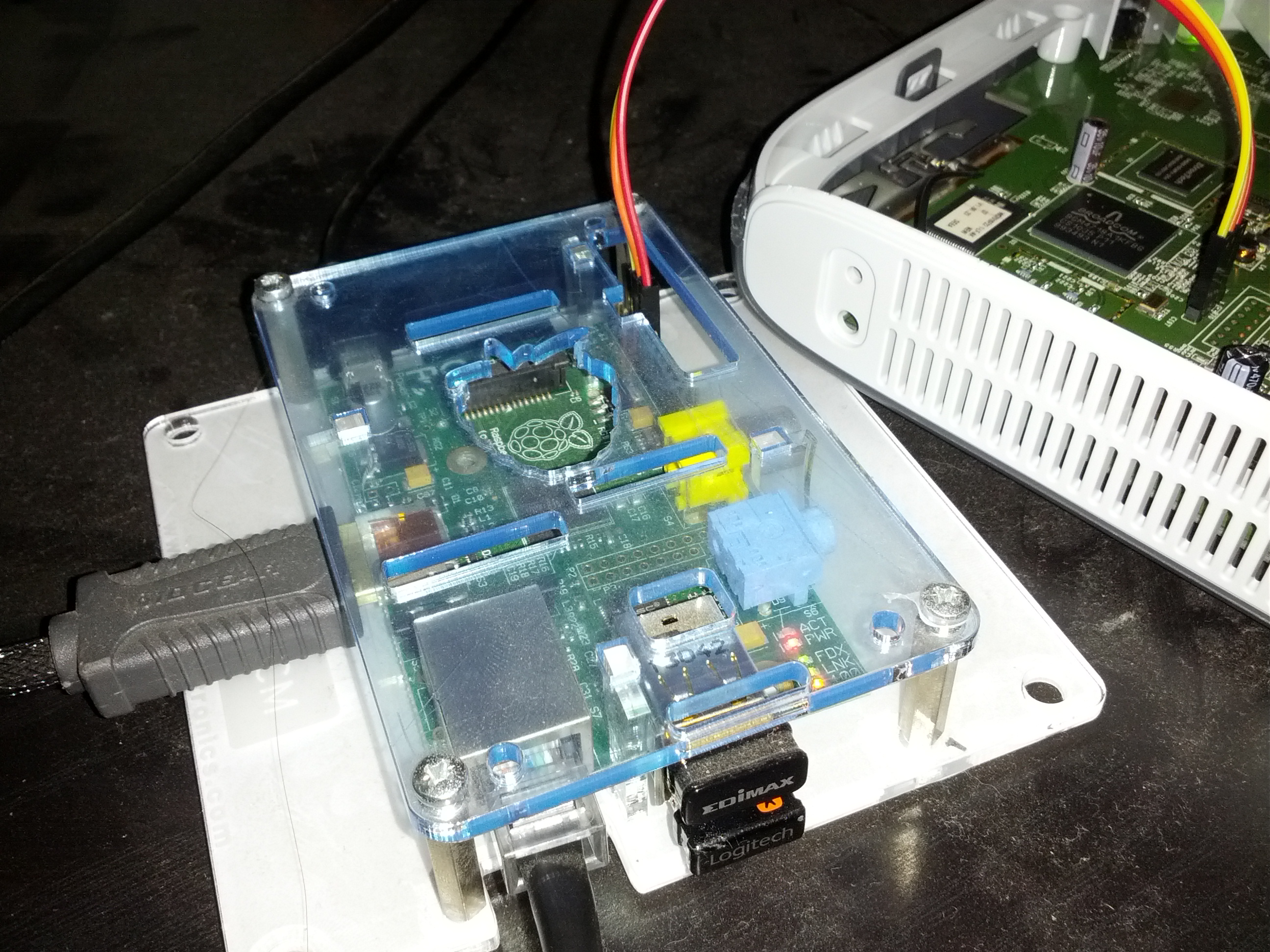
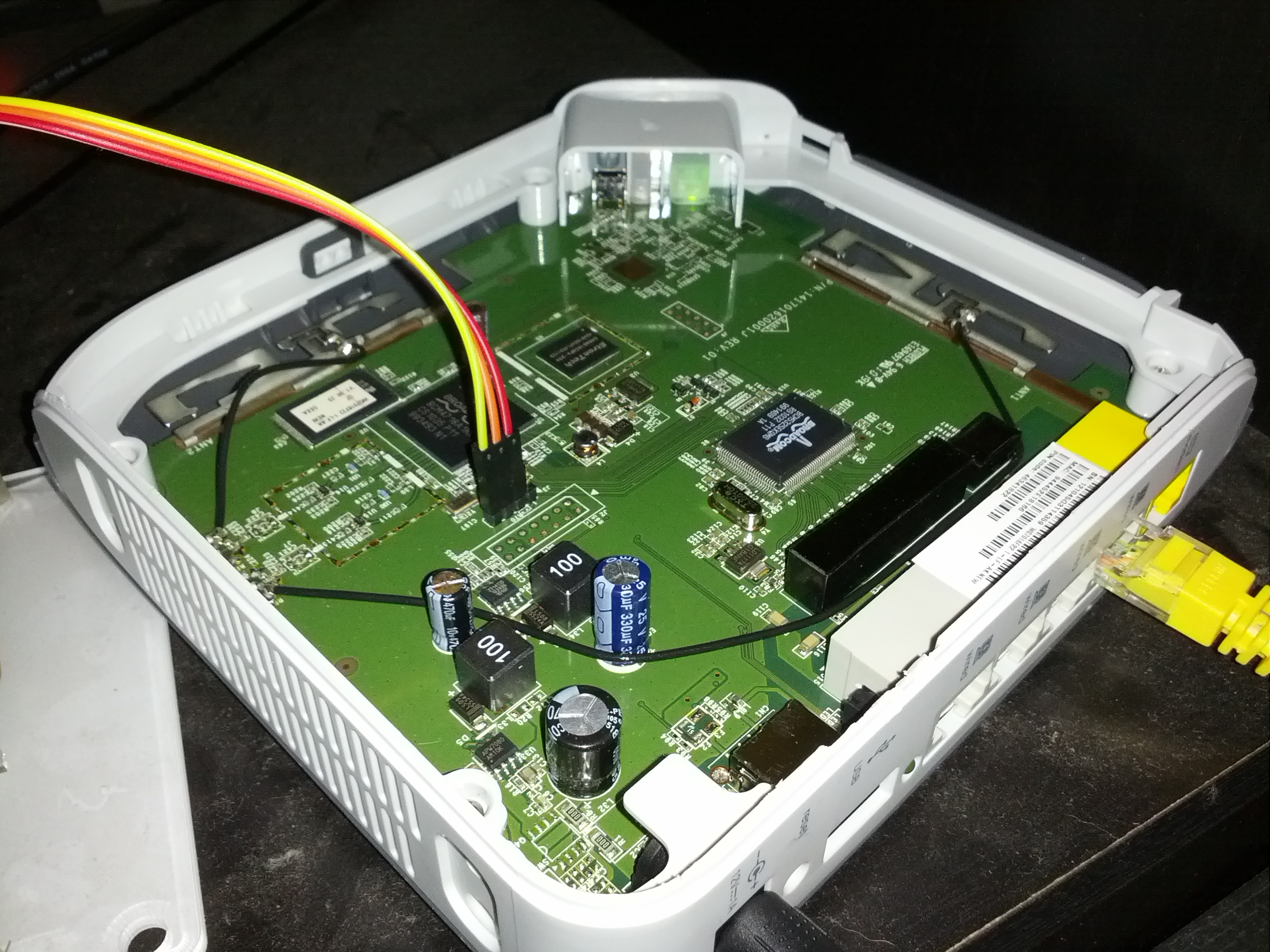
<p>Now we connect these ports to the router (Router should be off)
RPi - Router
GND &lt;-&gt; GND
TX  &lt;-&gt; RX
RX  &lt;-&gt; TX</p>

<p><img src="/assets/images/recovering/2014_02_09_00_53_27.jpg" alt="RPi" /></p>

<p><img src="/assets/images/recovering/2014_02_09_00_53_33.jpg" alt="F7D7302 serial" /></p>

<h3 id="listen-to-the-serial">Listen to the serial</h3>

<p>Install minicom in the RPi</p>

<div class="language-shell highlighter-rouge"><div class="highlight"><pre class="highlight"><code><span class="nb">sudo </span>apt-get <span class="nb">install </span>minicom
</code></pre></div></div>

<p>Then run minicom on the serial port of the RPi</p>

<div class="language-shell highlighter-rouge"><div class="highlight"><pre class="highlight"><code><span class="nb">sudo </span>minicom <span class="nt">-b</span> 115200 <span class="nt">-o</span> <span class="nt">-D</span> /dev/ttyAMA0
</code></pre></div></div>

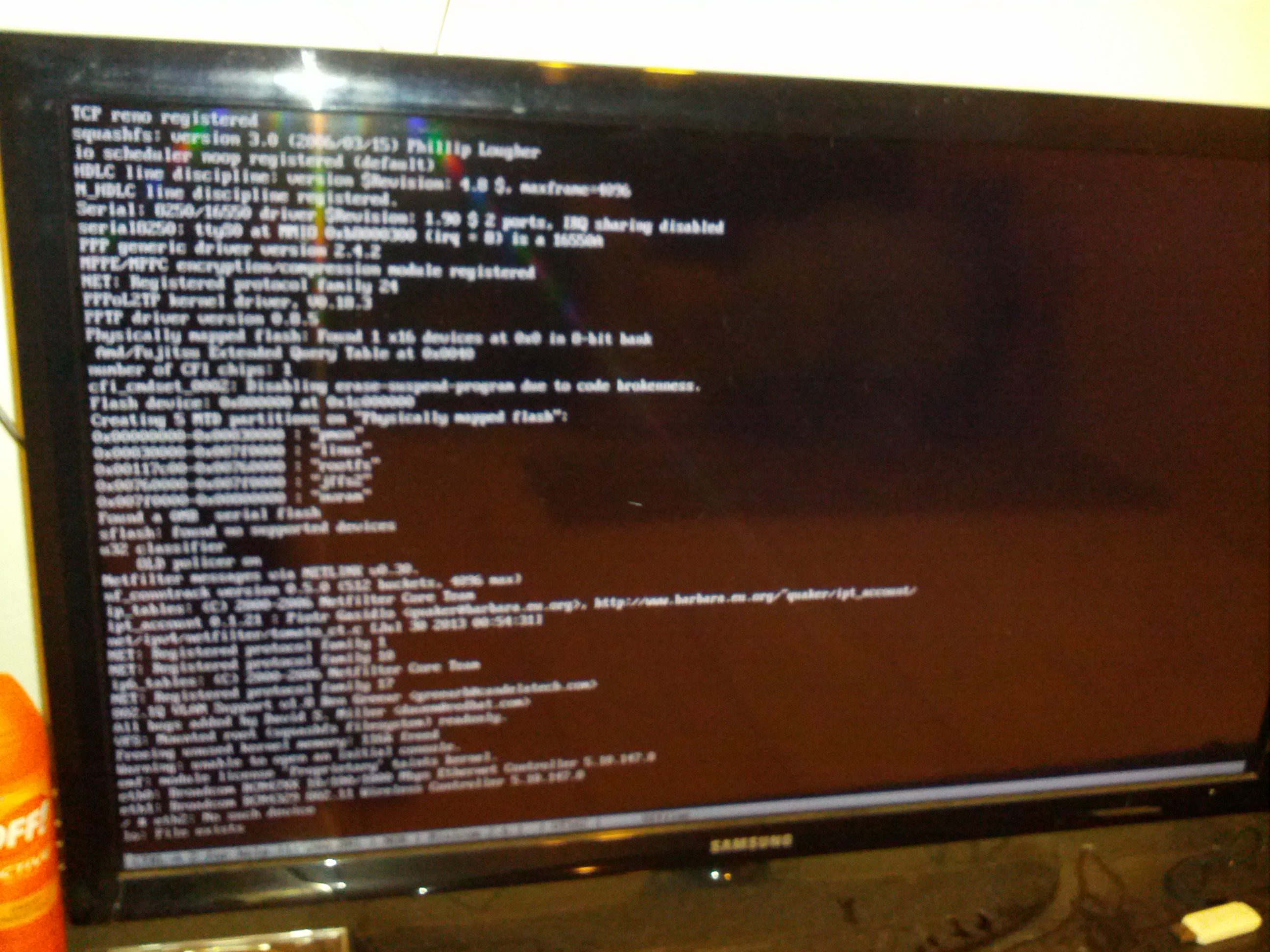
<p>Now power on the router while holding <code class="language-plaintext highlighter-rouge">Ctrl</code> + <code class="language-plaintext highlighter-rouge">C</code> and now the terminal should
capture whatever is going in the router, sorry for not providing better looking
images.</p>

<p><img src="/assets/images/recovering/2014_02_09_00_54_18.jpg" alt="minicom output" /></p>

<p>In this case, the router was stuck verifying something and since it was wrong it
rebooted every time it got to that point, the good thing is that now I knew the
bootloader was OK and I didn’t need to use jtag.
I pressed the <code class="language-plaintext highlighter-rouge">space</code> bar to stop the verification and finally got to the CFE
prompt.
Cleared nvram and reboot</p>

<div class="language-shell highlighter-rouge"><div class="highlight"><pre class="highlight"><code>CFE&gt; nvram erase
CFE&gt; reboot
</code></pre></div></div>

<h3 id="success">Success</h3>

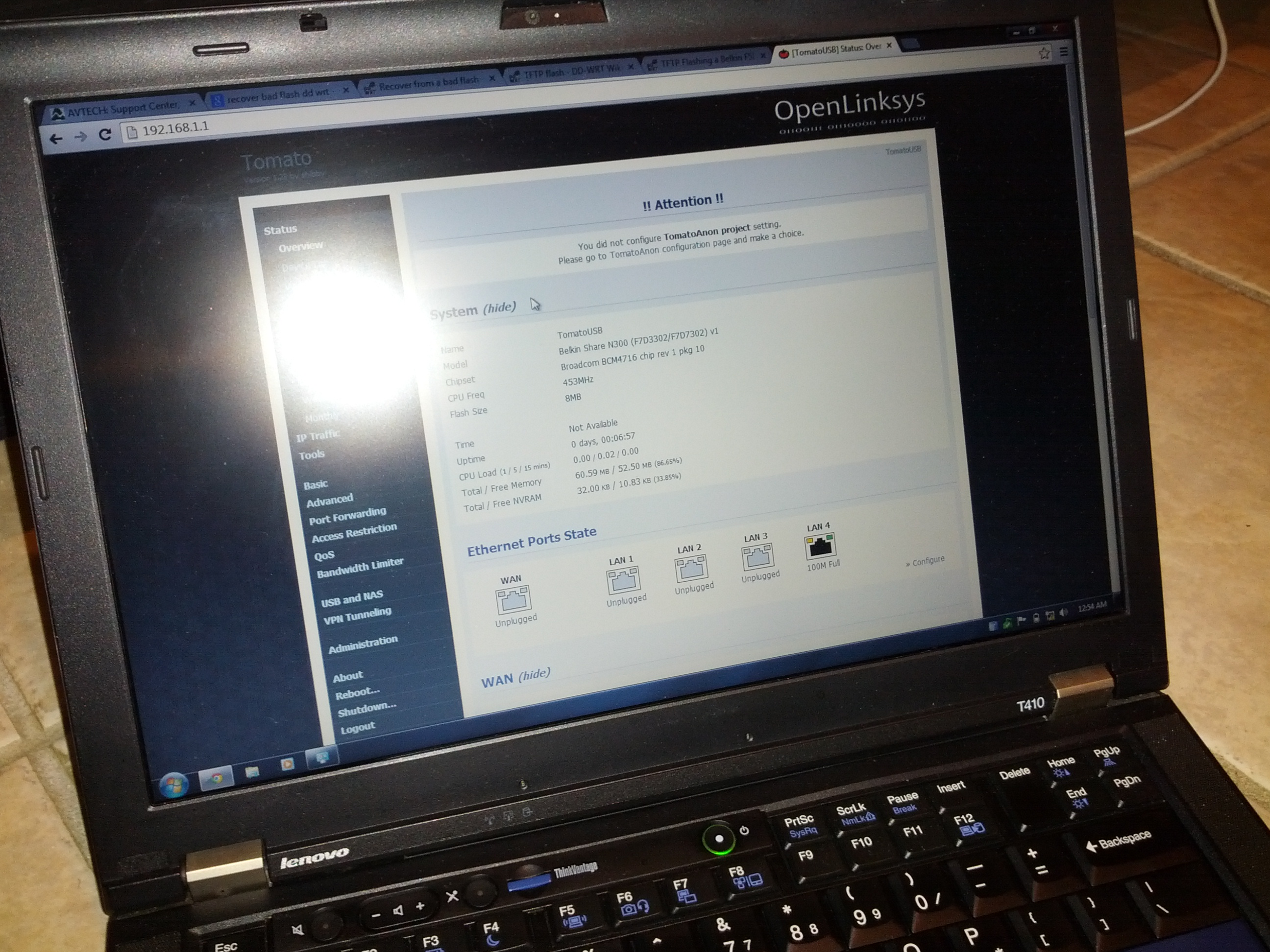
<p>I finally saw the device assigning and IP address to port, I connected a
computer to Port 1 and openned 192.168.1.1</p>

<p><img src="/assets/images/recovering/2014_02_09_00_54_02.jpg" alt="web console is back" /></p>

<p>TOMATO was up and running, for some reason the hard reset was not doing its
thing.</p>

<p>Now F7D7302 is working again :)</p>

<p>P.S. This is how the mess looked like</p>

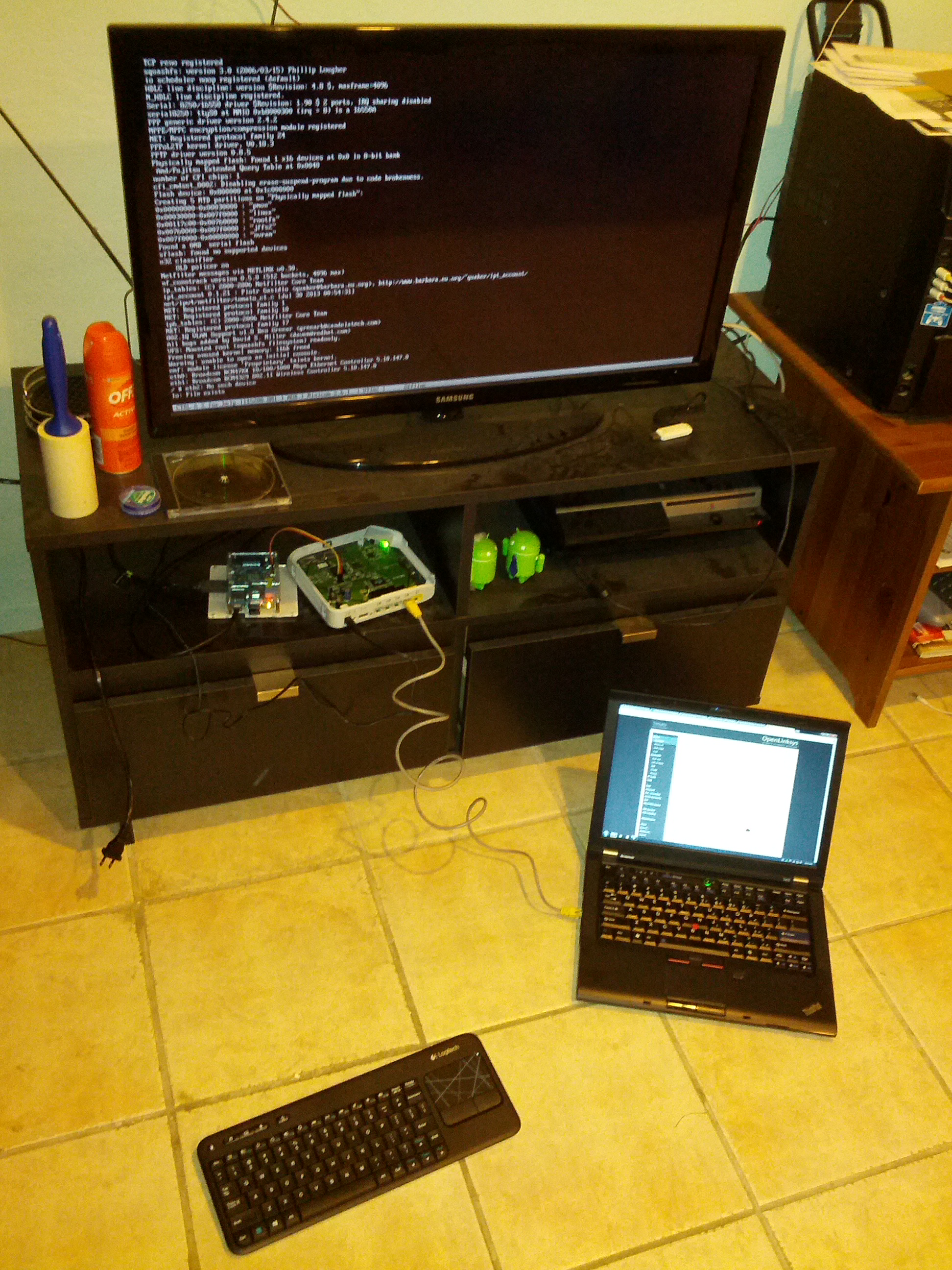
<p><img src="/assets/images/recovering/2014_02_09_00_54_30.jpg" alt="dirty setup" /></p>

<p>If you think I might be able to help you out contact me on
<a href="http://twitter.com/ricdros">Twitter</a></p>

<p>Sources:</p>

<ul>
  <li><a href="http://appventures.tweakblogs.net/blog/8736/unbricking-your-router-with-a-raspberry-pi.html">Unbricking your router with a Raspberry Pi</a></li>
  <li><a href="http://thegreatgeekery.blogspot.com/2011/08/belkin-f7d3302-hacking.html">Belkin F7D3302 Hacking</a></li>
  <li><a href="http://dd-wrt.com/wiki/index.php/Serial_Recovery">Serial Recovery</a></li>
</ul>]]></content><author><name>Ricardo Rosales</name></author><category term="Raspberry Pi" /><category term="Serial" /><category term="F7D7302" /><category term="Belkin" /><summary type="html"><![CDATA[Last year, I was trying to help a friend change his router’s firmware (Belkin Share N300 Wireless N+ Router MiMo 3D &amp; USB Port) to DD-WRT, he tried first and something didn’t work like it should and asked me for help, because I’ve been succesful to make DD-WRT work in other 2 routers (WRT54GL &amp; F7D7301).]]></summary></entry></feed>